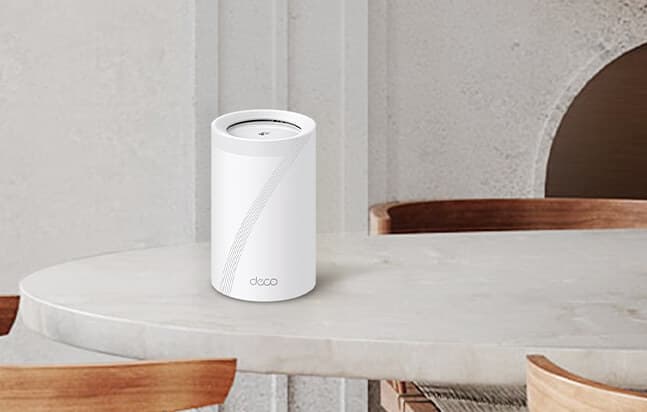
The TP-Link Deco BE63 Pro promises to cover your entire home in fast, seamless Wi-Fi — no dead zones, no buffering, no fighting over bandwidth. And it mostly delivers. The hardware is genuinely good. The Deco app is one of the easiest setup experiences you'll find. The speed is real.
But there's a catch that's hard to ignore: nearly half of the people who buy it run into reliability problems. Random drops, devices that won't reconnect, wired connections that cut out. TP-Link packed this system with impressive specs, then undercut them with firmware issues that turn some buyers into tinkerers and others into returns.
We dug through the spec sheet, real-world speed tests, and hundreds of customer reviews to figure out who this is actually for — and who should look elsewhere.
The Raw Performance: What "BE10000" Actually Means
TP-Link slaps the "BE10000" badge on this system, which translates to a theoretical combined throughput of 10 Gbps across its tri-band architecture:
- The 6 GHz Band (5,188 Mbps): The undisputed fast lane, built specifically for your newest, high-bandwidth hardware.
- The 5 GHz Band (4,324 Mbps): The workhorse layer balancing speed and distance for the majority of your modern devices.
- The 2.4 GHz Band (574 Mbps): The legacy layer handling smart home tech and extending range through walls.
Real-world translation: The multi-link operation genuinely works. By allowing simultaneous connections across these frequency bands, it heavily reduces network congestion. In practical testing, one user running 2 Gbit AT&T Fiber reported pulling down over 900+ Mbps for both upload and download speeds. Naturally, your mileage will vary depending on node placement and wall density, but the raw speed potential is undeniably there.
The Hardware Trap: The 2.5G Port Controversy
For power users, wired backhaul is everything. On paper, the BE63 Pro looks like a powerhouse:
- Four 2.5G WAN/LAN ports (plus a USB 3.0 port) on every single unit.
- Multi-gig support engineered for lightning-fast NAS backups, 4K streaming, and zero-latency gaming.
- Dual backhaul capability, meaning it can simultaneously leverage a 10G Ethernet connection alongside the wireless tri-band Wi-Fi 7 connection to hyper-optimize the network.
- Four internal antennas per unit to keep the aesthetic clean without sacrificing signal.
The Catch: This is where the marketing clashes with reality. A significant number of users have discovered that those heavily advertised 2.5G ports are currently bottlenecking at 1 Gbps due to a firmware limitation. If you are specifically investing $350+ into a multi-gig ecosystem to maximize a high-speed fiber plan or local server setup, this discrepancy is a massive red flag.
Coverage, Setup, and Smart Home Management
Setup is the one thing almost nobody complains about — 89% of users praise how fast the Deco app gets you running. All three units function as independent routers, so you can spread them however your floor plan demands.
The network footprint holds up:
- It easily penetrates 2-story and split-level homes.
- Outdoor range holds up well enough to keep security cameras and smart lights connected without drops.
- AI-Roaming smoothly hands off your phone or laptop to the strongest node as you walk around the house. While the system supports up to 6 nodes, the base 3-pack is more than enough for the vast majority of properties.
The software ecosystem is equally dense:
- You get heavily requested features like customizable SSIDs, allowing you to split the 2.4 GHz, 5 GHz, and 6 GHz bands if you choose.
- Dedicated Guest and IoT network segmentation to keep your smart fridge isolated from your primary work computer.
- Voice control via Alexa and Google Assistant, plus Matter protocol support for centralized smart home management.
- Note on Security: The built-in HomeShield offers solid threat detection and VPN support, but be aware that the more advanced parental controls are paywalled behind a subscription.
The Achilles' Heel: A Coin-Toss on Reliability
This is the deciding factor. Customer sentiment regarding the BE63's stability is jarringly polarized.
The Good (56% of users): A slight majority report a flawless "set it and forget it" experience, highlighting rock-solid stability and seamless operation over months of continuous use.
The Bad (44% of users): A near-equal contingent reports a completely different, highly frustrating reality. Recurring complaints include:
- Random network drops that force manual hard resets.
- Devices getting "stuck" and refusing to reconnect without rebooting the entire mesh system.
- Wired ethernet connections periodically dropping out.
- Bandwidth throttling when attempting large local file transfers.
When a premium networking product has a 44% unfavorable reliability rating, it points to deeper issues — likely a mix of firmware bugs, QA inconsistencies on the manufacturing line, or strict compatibility quirks with specific ISP modems.
Final Verdict: Who Should Actually Buy This?
At $357.99 (a 27% discount), the TP-Link Deco BE63 Pro looks like a steal for Wi-Fi 7 tech. But it's a gamble. It feels like TP-Link prioritized cramming the spec sheet full of features over rigorous pre-launch QA testing.
Buy it if: You are a tech enthusiast or remote creator with a fiber connection, living in a multi-story home with 150+ smart devices. If you are comfortable troubleshooting firmware and need those 900+ Mbps wireless speeds, the value is there.
Skip it if: You want invisible, bulletproof reliability. If you rely on stable multi-gig wired backhaul, the 2.5G firmware cap will infuriate you.
For the average household simply looking to eliminate dead zones, a high-end Wi-Fi 6 mesh system in the $200–$250 range will deliver 95% of the practical performance with significantly less headache.