
Editorial disclosure: This is a research-based specification analysis and buying guide, not a hands-on review. We did not test a ThinkPad E16 Gen 4 AMD for this article. Details about ports, components, battery tests, security, and available configurations come from Lenovo, AMD, Microsoft, and Canonical documentation. Without a test unit, we cannot judge fan noise, surface temperatures, display calibration, sustained performance, speaker quality, keyboard feel, or everyday battery life. We therefore do not score those areas or present them as measured facts.
Overview
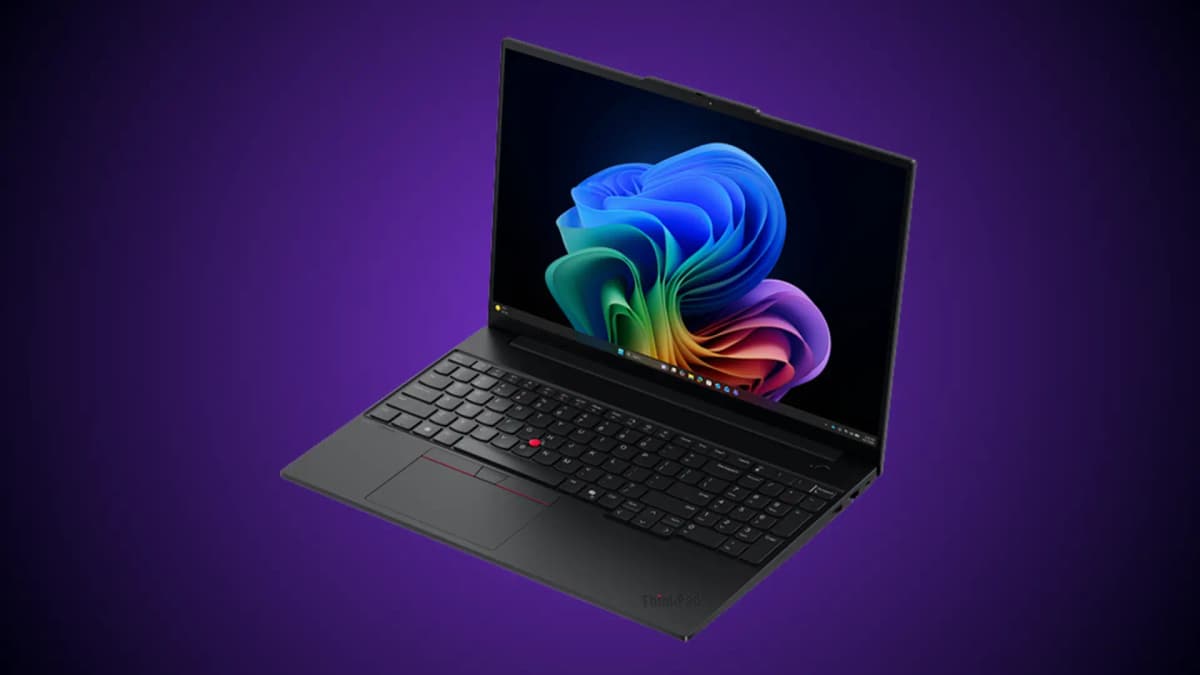
The Lenovo ThinkPad E16 Gen 4 AMD is a 16-inch business laptop for people who want familiar ThinkPad features without paying T-series prices. You still get the ThinkPad keyboard, red TrackPoint, business security, wired Ethernet, and relatively easy access to replaceable parts.
It may look much like the previous model, but this is a worthwhile update. Lenovo adds AMD Ryzen AI 300- and 400-series processors with a 50-TOPS NPU, upgrades both USB-C ports to 40Gbps USB4, and raises every display option to 400 nits. Buyers can also choose a 100% sRGB, 120Hz screen. The advertised starting weight drops from 1.71 kg to 1.63 kg.
Here is the catch: the name alone does not tell you exactly what you are buying. Lenovo sells this laptop with 48Wh or 64Wh batteries, two chassis builds, three cameras, three displays, optional keyboard lighting and fingerprint login, several operating systems, and different warranties.
Always check the full machine type and model number, or MTM. Two laptops carrying the ThinkPad E16 Gen 4 AMD name can be surprisingly different.
What Actually Changed From the Gen 3 AMD
| Area | ThinkPad E16 Gen 3 AMD | ThinkPad E16 Gen 4 AMD | Practical meaning |
|---|---|---|---|
| Processor ceiling | Up to Ryzen 7 250 | Up to Ryzen AI 7 450 | Newer platform; performance depends on the CPU and cooling |
| NPU | Up to 16 TOPS | 50 TOPS | Gen 4 hardware can qualify for Copilot+ PC features |
| USB-C | One USB4 40Gbps plus one USB-C 5Gbps | Two USB4 40Gbps ports | The clearest connectivity upgrade |
| Base display | 1920×1200, 300 nits, 45% NTSC, 60Hz | 1920×1200, 400 nits, 45% NTSC, 60Hz | Better brightness, but base-panel color remains limited |
| Premium displays | Regional options varied | 100% sRGB, 120Hz touch or 2560×1600 non-touch | Better color for visual work and smoother motion |
| Battery choices | 48Wh or 64Wh | 48Wh or 64Wh | The battery was not standardized at 64Wh |
| Starting weight | 1.71 kg | 1.63 kg | Up to an 80 g reduction based on Lenovo's starting figures |
| Wireless | Some Gen 3 listings already offered Wi-Fi 7 | Wi-Fi 7 adapters listed for Gen 4 | Not every region treats Wi-Fi 7 as a new feature |
Swipe sideways to compare the full chart.
The NPU rating rises from 16 to 50 TOPS—just over three times higher on paper. That number does not tell you how fast every app will feel, though. For most people, the more useful change is dual USB4. Either USB-C port can now handle fast accessories, charging, and DisplayPort video.
Verified Specifications
| Specification | Verified details |
|---|---|
| Product family | Lenovo ThinkPad E16 Gen 4 AMD |
| Machine type | 21Y4 |
| Processor options | Seven documented Ryzen AI 300/400 choices, up to Ryzen AI 7 450 |
| CPU architecture | AMD Zen 5 and Zen 5c hybrid designs; the mix varies by processor |
| Integrated graphics | Radeon 820M, 840M, or 860M depending on processor |
| NPU | 50 TOPS on all documented processors |
| Memory | Two DDR5-5600 SODIMM slots; up to 64GB according to Lenovo PSREF |
| Storage | Two PCIe 4.0 x4 M.2 slots: one 2242 and one 2280; Lenovo documents up to 1TB per slot |
| Displays | Three 16-inch, 16:10 IPS options; all rated at 400 nits |
| Battery | 48Wh with Rapid Charge Pro, or 64Wh with Rapid Charge |
| Starting weight | 1.63 kg; your configuration may weigh more |
| Chassis | Aluminum top with either PC-ABS or aluminum bottom |
| Ports | 2× USB4 40Gbps USB-C, 2× USB-A, HDMI 2.1, RJ-45, 3.5mm audio, Kensington Nano slot |
| Wireless | Wi-Fi 7 2×2 and Bluetooth 5.4; adapter vendor varies |
| Camera | 720p, 5MP, or 1080p + IR hybrid; all listed with privacy shutter |
| Keyboard | Spill-resistant six-row keyboard with numeric keypad and TrackPoint; backlight optional |
| Security | Discrete TPM 2.0, self-healing BIOS, optional Match-on-Chip fingerprint reader, optional IR camera |
| Operating systems | Windows 11 Pro, Windows 11 Home, Ubuntu Linux, or no preloaded OS, depending on model |
| External displays | Up to three external displays, or four independent displays including the internal panel |
| Warranty | Varies by MTM and region, including one-year service and no-base-warranty models |
| Ruggedness testing | Lenovo says the system is tested against MIL-STD-810H; this does not make it a rugged laptop |
Swipe sideways to compare the full chart.
Processor Options
Lenovo's May 2026 PSREF lists seven processors. Ignore any simple split between “full Zen 5” and “efficiency-only” models. AMD's specifications show that these chips mix Zen 5 and Zen 5c cores in different proportions.
| Processor | AMD family | Core layout | Cores / threads | Max boost | Integrated GPU | NPU |
|---|---|---|---|---|---|---|
| Ryzen AI 5 330 | Ryzen AI 300, Krackan Point | 1× Zen 5 + 3× Zen 5c | 4 / 8 | 4.5GHz | Radeon 820M | 50 TOPS |
| Ryzen AI 5 430 | Ryzen AI 400, Gorgon Point | 1× Zen 5 + 3× Zen 5c | 4 / 8 | 4.5GHz | Radeon 840M | 50 TOPS |
| Ryzen AI 5 435 | Ryzen AI 400, Gorgon Point | 2× Zen 5 + 4× Zen 5c | 6 / 12 | 4.5GHz | Radeon 840M | 50 TOPS |
| Ryzen AI 5 PRO 340 | Ryzen AI PRO 300, Krackan Point | 3× Zen 5 + 3× Zen 5c | 6 / 12 | 4.8GHz | Radeon 840M | 50 TOPS |
| Ryzen AI 7 345 | Ryzen AI 300, Krackan Point | 2× Zen 5 + 4× Zen 5c | 6 / 12 | 4.6GHz | Radeon 840M* | 50 TOPS |
| Ryzen AI 7 445 | Ryzen AI 400, Gorgon Point | 2× Zen 5 + 4× Zen 5c | 6 / 12 | 4.6GHz | Radeon 840M | 50 TOPS |
| Ryzen AI 7 450 | Ryzen AI 400, Gorgon Point | 4× Zen 5 + 4× Zen 5c | 8 / 16 | 5.1GHz | Radeon 860M | 50 TOPS |
Swipe sideways to compare the full chart.
* Source discrepancy: AMD lists the Ryzen AI 7 345 with 6MB of L2 cache and Radeon 840M graphics. Lenovo's May 14, 2026 PSREF instead lists 4MB of L2 cache and Radeon 820M graphics, while Lenovo Germany identifies the same processor with Radeon 840M graphics. We used AMD's processor database in the table. Check the graphics specification for the exact Lenovo MTM before you buy.
Which processor should you choose?
Ryzen AI 5 330: Pick this entry model for documents, browser apps, email, video calls, and light multitasking. Its four CPU cores and Radeon 820M keep it firmly in basic office territory.
Ryzen AI 5 430: This is still a four-core chip, but the Radeon 840M has twice as many graphics cores as the 820M. It is the more appealing entry option if your apps make modest use of graphics acceleration.
Ryzen AI 5 435, Ryzen AI 7 345, and Ryzen AI 7 445: These six-core, twelve-thread chips are a better fit for development tools, large spreadsheets, heavier multitasking, and occasional virtual machines. We have not independently tested how well they sustain performance in this chassis.
Ryzen AI 5 PRO 340: This is the only AMD PRO chip in Lenovo's list. Lenovo marks it as a special-bid option, so businesses may see it through procurement channels even when regular shoppers cannot.
Ryzen AI 7 450: Choose this eight-core, 16-thread model when you genuinely need the fastest CPU and integrated graphics offered here. It also brings 16MB of L3 cache and the larger Radeon 860M. How much faster it remains during long jobs will depend on Lenovo's cooling and power limits.
Performance: what the specifications can tell us
We have not tested the E16 Gen 4 AMD chassis, so quoting exact benchmark scores, compilation times, gaming frame rates, fan noise, temperatures, or everyday responsiveness would create false confidence.
The specifications do support a few practical conclusions:
- Four-core models suit mainstream office work.
- Six-core models give heavier multitasking and development tools more breathing room.
- The eight-core Ryzen AI 7 450 is the fastest listed CPU and includes the largest integrated GPU.
- Two SODIMM slots let you configure 32GB or 64GB for virtual machines, large projects, and memory-heavy analysis.
- Radeon 820M, 840M, and 860M graphics are still integrated. They do not replace a discrete workstation or gaming GPU.
- Processor benchmark databases cannot show how this laptop performs during a long workload. Cooling and firmware power limits matter too much.
Display options
Lenovo offers three 16-inch IPS displays. All use a taller 16:10 shape and carry the same 400-nit brightness rating, but their color, resolution, touch support, and refresh rates differ.
| Feature | Base WUXGA | WUXGA Touch | WQXGA |
|---|---|---|---|
| Resolution | 1920×1200 | 1920×1200 | 2560×1600 |
| Touch | No | In-cell touch | No |
| Brightness | 400 nits | 400 nits | 400 nits |
| Color gamut | 45% NTSC | 100% sRGB | 100% sRGB |
| Refresh rate | 60Hz | 120Hz with VRR | 120Hz with VRR |
| Surface | Anti-glare | Anti-glare | Anti-glare |
Swipe sideways to compare the full chart.
The base 45% NTSC panel
The base display is the biggest compromise. Its 45% NTSC color rating is fine for documents, spreadsheets, business web apps, and general office work. It is a poor choice for photography, design, or video work where colors need to look right.
Do not convert 45% NTSC into a precise sRGB figure and treat it as guaranteed. The two gamut standards do not share one perfect conversion, and Lenovo does not publish an sRGB rating for this panel.
The 100% sRGB panels
Both upgrades cover 100% sRGB and run at 120Hz. The WUXGA model adds touch; the WQXGA model raises the resolution to 2560×1600. Either is a much better fit for web graphics, photos, presentations, or long sessions with dense text.
Lenovo does not provide factory Delta-E results, DCI-P3 coverage, HDR certification, tested contrast, or PWM behavior for every panel supplier. If you need verified color accuracy, someone must measure the exact screen in your unit.
Design and build
Every version measures 356 × 249 mm across the desk. Maximum thickness depends on the bottom panel:
- Aluminum top and PC-ABS bottom: up to 21.95 mm
- Aluminum top and aluminum bottom: up to 21.15 mm
The laptop starts at 1.63 kg, but do not assume every configuration weighs that little. One current Australian model, for example, is listed at 1.65 kg.
Not every E16 Gen 4 AMD is “all aluminum.” Lenovo sells one version with an aluminum lid and PC-ABS bottom, and another with aluminum on both sides.
Lenovo says the laptop passed MIL-STD-810H tests. That means it completed selected environmental procedures under controlled conditions. It does not make the E16 waterproof, drop-proof, or equivalent to a rugged field laptop.
We cannot tell you whether the lid opens with one finger, the hinge feels smooth, or the keyboard deck flexes without handling the laptop. Those impressions need a physical sample.
Keyboard, TrackPoint, and touchpad
The E16 Gen 4 has a six-row, spill-resistant keyboard with:
- a numeric keypad
- the red TrackPoint
- dedicated TrackPoint buttons
- multimedia function keys
- a Copilot key on supported Windows configurations
- 1.5 mm travel for the main keys
- 1.35 mm travel for the function row and the G, H, and B keys
Keyboard backlighting costs extra on some configurations, so check before ordering. Lenovo describes the touchpad surface as Mylar, not glass. Only call it a glass touchpad if the exact MTM says so.
Memory, storage, and upgrades
Memory
Lenovo specifies two DDR5-5600 SODIMM slots, dual-channel memory, and support for up to 64GB. What arrives in those slots depends on the model. A current Philippines configuration uses 2×8GB, while an Australian listing simply says 16GB and does not reveal the module layout.
If you plan to upgrade, check how many modules are already installed before buying RAM.
Storage
The system has:
- one M.2 2242 PCIe 4.0 x4 slot
- one M.2 2280 PCIe 4.0 x4 slot
- official support for up to 1TB in each slot, for a documented 2TB total
Some Lenovo SSDs support TCG Opal 2.0 hardware encryption. That feature belongs to the drive itself; adding any third-party SSD does not automatically give you Opal support.
Repair documentation
Lenovo publishes a Hardware Maintenance Manual for the ThinkPad E14 Gen 8 and E16 Gen 4. It also lists the battery, memory, speakers, and SSD as parts customers can replace. That is encouraging for long-term serviceability.
Still, follow the manual, disconnect power correctly, and check the warranty before opening the laptop.
Ports and external displays
The port selection is one of this laptop's strongest features:
- 2× USB-C with USB4 40Gbps, USB Power Delivery, and DisplayPort 1.4a
- 1× USB-A 5Gbps
- 1× USB-A 10Gbps with Always On
- 1× HDMI 2.1, officially rated up to 4096×2160 at 60Hz
- 1× Gigabit Ethernet RJ-45
- 1× 3.5mm headphone/microphone combination jack
- 1× Kensington Nano Security Slot
Lenovo supports up to four independent displays: the laptop screen plus three external monitors. The resolution and refresh rate available on each monitor will depend on how you connect them, which screens are active, and whether Display Stream Compression is in use.
Dual USB4 is a real upgrade over the Gen 3 AMD, which paired one USB4 port with a slower USB-C data port.
What is missing? There is no SD or microSD card reader, mobile-broadband option, or NFC.
Wireless connectivity
Lenovo lists 2×2 Wi-Fi 7 adapters from MediaTek and Realtek, plus Bluetooth 5.4. The exact adapter brand depends on the MTM.
Wi-Fi 7 is not always a Gen 4-only upgrade; some official Gen 3 AMD listings already offered it. You will also need a compatible router, operating system, drivers, and local regulatory support to use its full feature set.
Camera, audio, and video calls
Lenovo lists three cameras:
- 720p RGB with privacy shutter
- 5MP RGB with privacy shutter and temporal noise reduction
- 1080p + IR hybrid with privacy shutter and temporal noise reduction
The IR camera supports Windows Hello face recognition on compatible Windows models, but it is optional. Do not assume every configuration includes a 1080p IR camera.
You also get two far-field microphones with software noise cancellation and two 2W speakers carrying Dolby Atmos and Harman branding. Those specifications cannot tell us how clear, loud, or full they sound—or how well the microphones reject background noise. That takes hands-on testing.
Security and IT management
Verified security features include:
- discrete TPM 2.0
- TCG certification and FIPS 140-3 certification for the security chip
- self-healing BIOS
- camera privacy shutter
- BIOS, power-on, supervisor, system-management, and NVMe password options
- Kensington Nano lock slot
- optional Match-on-Chip fingerprint reader in the power button
- optional IR camera for Windows Hello facial recognition
There is no smart-card reader. Lenovo also lists the laptop as Non-DASH, an important limitation for organizations that rely on AMD DASH for remote management.
“ThinkShield” is Lenovo's broad security label, not a guarantee that every security feature is present. Verify the exact MTM instead of relying on the brand name.
Copilot+ PC and AI features
Every listed processor includes a 50-TOPS neural processing unit, or NPU. Microsoft's current Copilot+ PC hardware requirements call for a compatible NPU rated at 40 TOPS or more, at least 16GB of DDR5 or LPDDR5 memory, and at least 256GB of SSD or UFS storage.
That makes the hardware capable, but it does not guarantee every Copilot+ feature on every E16 Gen 4 AMD:
- Copilot+ experiences require Windows 11.
- Ubuntu and no-OS models do not include Windows Copilot+ features.
- Availability can depend on the Windows version, updates, hardware, language, account type, and region.
- Microsoft offers features such as Windows Studio Effects, Live Captions, improved Windows Search, Cocreator, Click to Do, and Recall, but the list changes over time.
- Recall is opt-in on supported consumer systems, with separate controls for managed business devices.
The NPU speeds up supported AI tasks. It does not replace a discrete GPU for training large machine-learning models, and it cannot accelerate software that does not support it.
Battery and charging
Do not assume the laptop comes with the larger 64Wh battery. Lenovo offers two sizes:
| Battery | Charging claim |
|---|---|
| 48Wh, 3-cell | Rapid Charge Pro: up to 50% in 30 minutes |
| 64Wh, 4-cell | Rapid Charge: up to 80% in one hour |
Swipe sideways to compare the full chart.
Lenovo guarantees those fast-charging figures only when the laptop is off, asleep, or hibernating. Charging can take longer while you use the computer.
Lenovo's laboratory battery results
Lenovo publishes these maximum results for Windows 11 configurations with 16GB of RAM, the 64Wh battery, and the non-touch WUXGA display. The company used its own specified power settings:
| Processor | MobileMark 30 | JEITA 3.0 video / idle | Local 1080p video |
|---|---|---|---|
| Ryzen AI 7 445 | Up to 14.86 hours | Up to 14.76 / 24.06 hours | Up to 22.53 hours |
| Ryzen AI 7 345 | Up to 14.23 hours | Up to 13.75 / 23.61 hours | Up to 22.30 hours |
| Ryzen AI 7 450 | Up to 13.58 hours | Up to 14.35 / 22.45 hours | Up to 23.03 hours |
Swipe sideways to compare the full chart.
Treat these as controlled best-case benchmarks, not a promise for your working day. Battery size, screen, brightness, processor load, Wi-Fi use, apps, power mode, background tasks, temperature, and battery age all affect runtime. Without our own testing, giving a “real-world” estimate would be guesswork.
Either USB-C port can charge the laptop with the included 65W adapter. A third-party charger may power the computer without reaching Lenovo's advertised charging speed. The charger, cable, and USB Power Delivery profile must all be suitable.
Windows and Linux options
Lenovo lists models with Windows 11 Pro, Windows 11 Home, Ubuntu Linux, or no operating system preinstalled. Windows 11 Pro is not the only choice.
An official Ubuntu option shows that Lenovo intends to support Linux on at least some configurations. However, as of our July 24, 2026 check, Canonical's public list of certified Lenovo laptops did not include this exact model. “Sold with Ubuntu” and “currently certified by Canonical” are not the same claim.
Fingerprint login, the IR camera, Wi-Fi, sleep, power use, and firmware support can vary with the installed components and Linux version. If Linux is essential for work, verify the exact MTM and Lenovo's support terms before ordering a fleet.
Why the exact model and region matter
There is no single worldwide E16 Gen 4 AMD configuration—or one standard warranty.
These two official listings show how much can change:
Australia, model 21Y40064AU
- Ryzen AI 7 445
- 16GB DDR5
- 512GB SSD
- 48Wh battery
- 720p camera
- base 45% NTSC display
- backlit keyboard
- fingerprint reader
- 1-year onsite warranty
- listed weight of 1.65 kg
Philippines, model 21Y4CTO1WWPH1
- Ryzen AI 5 330
- 16GB as 2×8GB
- 256GB SSD
- 48Wh battery
- 720p camera
- base 45% NTSC display
- non-backlit keyboard listing
- no fingerprint reader
- 3-year Premier Support AI
Neither example represents every E16 Gen 4 AMD. Price, availability, warranty, keyboard, battery, display, camera, chassis material, and memory layout can all change with the country and MTM. That is why a worldwide “starting price” becomes misleading unless it is dated and tied to a specific model.
Best configurations for different buyers
These recommendations come from the specifications, not hands-on performance tests. Adjust them for local prices and availability.
| Use case | Recommended target | Why |
|---|---|---|
| Basic office fleet | Ryzen AI 5 330 or 430, 16GB, 512GB, WUXGA base panel | Enough for browsers, documents, email, and meetings |
| General professional use | Six-core Ryzen AI 5 435, AI 7 345, or AI 7 445; 16–32GB | More room for demanding multitasking |
| Developer | Ryzen AI 7 445 or 450, 32GB, 1TB, 100% sRGB display | More CPU power and memory, plus a better screen |
| Local VMs and containers | Ryzen AI 7 450, 32–64GB, dual SSDs if needed | Eight cores, 16 threads, and upgradeable memory |
| Web and visual content | Any suitable six- or eight-core CPU with a 100% sRGB panel | The screen matters more than a small jump in CPU tier |
| Lowest-cost long-term purchase | Entry CPU, but prioritize 16GB+, 512GB, and the 64Wh battery where affordable | Memory, storage, and battery often matter more each day than peak CPU speed |
| Enterprise deployment | Exact MTM checked for warranty, BIOS management, camera, biometrics, battery, and panel | The family name does not provide enough detail for a fleet order |
Swipe sideways to compare the full chart.
Do not pay extra for the Ryzen AI 7 450 simply because it sits at the top of the list. Email, browser apps, and documents do not need it. On the other hand, do not pair a fast processor with the 45% NTSC screen if your work depends on good color.
What the ThinkPad E16 Gen 4 AMD does well
- Two USB4 40Gbps ports
- Two accessible SODIMM slots with support for up to 64GB
- Two PCIe 4.0 SSD slots
- 100% sRGB, 120Hz display options
- 400-nit brightness across all documented panels
- 50-TOPS NPU across the processor range
- Wi-Fi 7 and built-in Gigabit Ethernet
- Choice of 48Wh or 64Wh battery
- Starting weight of 1.63 kg
- Spill-resistant keyboard with numeric keypad and TrackPoint
- A published Lenovo Hardware Maintenance Manual
- Windows, Ubuntu, and no-OS options
- Self-healing BIOS and discrete TPM 2.0
Where it falls short
- Base display is still limited to 45% NTSC
- Battery, chassis, camera, keyboard lighting, fingerprint reader, and warranty vary by MTM
- No discrete GPU option
- No SD card reader
- No WWAN or NFC
- No smart-card reader
- Non-DASH management
- Lenovo's PSREF validates SSDs only up to 1TB per slot
- This article has no hands-on thermal, noise, display-calibration, or performance results
- Regional Lenovo pages and PSREF sometimes disagree, making exact-model checks essential
Who should buy it?
The ThinkPad E16 Gen 4 AMD makes sense for:
- organizations that need a configurable 16-inch business laptop with Ethernet and repair documentation
- office users who value a numeric keypad, TrackPoint, and multiple ports
- developers who want two SODIMM slots and two SSD slots
- buyers who want a 100% sRGB business display without automatically moving to a more expensive ThinkPad series
- users who want an AMD Copilot+ PC with a 50-TOPS NPU
- Linux buyers choosing a Lenovo-supported Ubuntu configuration
Who should look elsewhere?
Choose another laptop if you need:
- a discrete GPU for professional 3D work, sustained GPU computing, or demanding games
- a smart-card reader, built-in mobile broadband, NFC, or a media-card reader
- AMD DASH remote management
- a sub-1.3 kg travel laptop
- guaranteed color accuracy beyond the stated 100% sRGB coverage
- verified temperatures and everyday battery life before buying, unless an independent review covers your exact configuration
Final assessment
The Lenovo ThinkPad E16 Gen 4 AMD is a meaningful upgrade. Dual USB4, a 50-TOPS NPU, brighter displays, 100% sRGB 120Hz screen options, and a lower starting weight all move the E-series forward.
But you need to shop carefully. Not every model has an all-aluminum chassis, 64Wh battery, backlit keyboard, fingerprint reader, 1080p IR camera, or Premier Support. Those details vary widely.
The most important buying rule is simple: choose by exact MTM, not by family name.
For most buyers, the sweet spot is a six-core processor, at least 16GB of RAM, a 512GB or larger SSD, the 64Wh battery, and one of the 100% sRGB displays. The Ryzen AI 7 450 is worth paying for when its eight cores and Radeon 860M will save you time. Otherwise, put that money toward the better screen, larger battery, or more memory. You will notice those upgrades every day.
We do not give the laptop a numerical score because we did not test a physical unit. A fair score would require measured performance, temperatures, noise, display quality, keyboard and touchpad impressions, and everyday battery life.