The Logitech Mobi Fold solves a problem that sounds trivial until you've lived with it: carrying a mouse that's comfortable enough to use for hours, but small enough to not be annoying when you're not using it.
Most travel mice force a choice. Flat ones like the Pebble Mouse 2 disappear into a bag pocket but leave your hand cramping after an hour. Bigger travel mice like the MX Anywhere 3S are genuinely comfortable, but they take up a meaningful chunk of your laptop sleeve. The Microsoft Surface Arc tried to split the difference with a bending spine design, but its 1000 DPI sensor and disposable batteries made it feel dated by 2023.
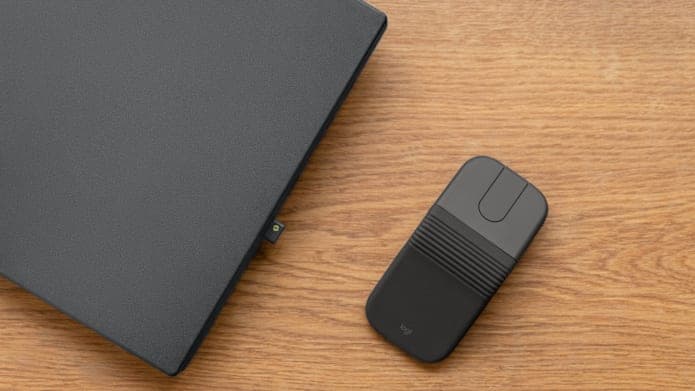
The Mobi Fold takes a different approach entirely. It folds in half. Open it up, and it becomes an arched, ergonomic-enough mouse with a 4000 DPI optical sensor. Fold it shut, and it becomes a flat square roughly the size of a deck of cards. No button to press—the hinge itself is the power switch.
This is a research-based review built from Logitech's official product pages, the Logitech Mobi Fold for Business specification sheet, the June 2026 press release, and independent coverage from NotebookCheck, PCMag, and The Gadgeteer. We have not run our own benchmarks on this exact unit, so performance comments below are based on published specifications, sensor data for the PAW3222, and the limits of the travel-mouse category.
- Best reason to buy: The folding mechanism is genuinely useful. A mouse that disappears into a jeans pocket and unfolds into a comfortable arch is something the travel category has never delivered well.
- Main compromise: No physical scroll wheel. The touch strip works, but it requires an adjustment period and won't satisfy people who depend on tactile mechanical feedback.
- Who this is for: Digital nomads, frequent travelers, café workers, and anyone who currently leaves their mouse at home because it's too bulky to carry.
- Who should skip: People who work permanently from one desk, need glass-surface tracking, or have very large hands that won't fit the compact profile.
What the Mobi Fold Actually Is
The Mobi Fold is a Bluetooth wireless mouse with a central hinge that allows the chassis to fold horizontally. When closed, it's a slim rectangle about 66 mm deep, 57 mm wide, and 21 mm thick. When open, the hinge pivots roughly 130 degrees and locks into an arched position, raising the palm contact point to 33 mm.
That folding action isn't just a party trick. It's the power mechanism. Open the mouse, and it wakes up and connects to the last paired device. Fold it shut, and it powers off instantly. There's no physical on/off switch anywhere on the body. The design eliminates the "I forgot to turn my mouse off and now the battery is dead" problem that every travel mouse owner has experienced.
Logitech sells two versions:
- Mobi Fold ($79.99): Bluetooth only, consumer model, available in Graphite, Off-White, Lilac, and Sand.
- Mobi Fold for Business ($89.99): Includes a Logi Bolt USB-C receiver, two-year warranty, and Logitech Sync enterprise support. Graphite only.
The Business model is the one with the Bolt receiver, which matters if you work in environments with heavy Bluetooth congestion or need the security of an encrypted dongle connection. For most people, the consumer model is the right pick.
Why This Product Exists
Logitech's own research numbers explain the motivation clearly: 72% of professionals own a computer mouse, but only 26% regularly use one in public spaces. The reason isn't that people don't want a mouse at airports and cafés. It's that traditional mice are too bulky to justify carrying "just in case."
The Mobi Fold is Logitech's attempt to remove that friction. If the mouse folds flat enough to live permanently in your laptop bag's smallest pocket—or even a jeans front pocket—there's no reason to leave it behind. The bet is that the people who currently survive on trackpads would switch to a real mouse if carrying one cost essentially nothing in bag space.
That reasoning is sound. The question is whether the engineering compromises required to make a mouse fold in half are ones you can live with.
The Folding Mechanism: How It Actually Works
Unlike the Microsoft Surface Arc, which bends along a continuous flexible spine, the Mobi Fold uses a rigid clamshell design. Two distinct halves are joined by an articulated central hinge, with accordion-like silicone ridges covering the joint.
When you fold the mouse shut, the two halves meet flat, held together by internal magnets. When you open it, the hinge pivots until the two halves lock into the arched operating position. The silicone pleats stretch and compress smoothly, protecting the internal wiring from dust and debris.
Logitech rates the hinge for 50,000 fold/unfold cycles. At several folds per day, that works out to roughly 15 years of daily use. The company also claims drop resistance from desk height (approximately 90 cm), and the silicone exterior does double duty as a shock absorber.
The internal layout is worth understanding. The 100 mAh lithium-polymer battery, the PAW3222 optical sensor, and the primary PCB all live in the front half of the mouse. The rear half is mostly structural—it provides the palm rest shape and the magnetic anchor that keeps the mouse closed. Power routing runs through the hinge, so opening and closing the mouse physically completes or breaks the circuit.
Specifications
| Specification | Value |
|---|---|
| Dimensions (unfolded) | 122 × 57 × 33 mm |
| Dimensions (folded) | ~66 × 57 × 21 mm |
| Weight | 79 g (2.79 oz) |
| Sensor | PAW3222 optical |
| DPI range | 400–4,000 (100 DPI steps) |
| Buttons | 4 (left, right, 2 capacitive touch panel) |
| Scroll | Adaptive Touch Scrolling strip |
| Battery | Rechargeable Li-Po, 100 mAh |
| Battery life | Up to 30 days (Bluetooth) |
| Charging | USB-C, 2.5W max |
| Quick charge | 1 minute = ~22 hours |
| Connectivity | Bluetooth 5.0 LE (Bolt receiver on Business model) |
| Multi-device | Up to 3 devices (Easy-Switch) |
| Quiet clicks | Yes |
| Software | Logi Options+ (Windows, macOS) |
| Colors | Graphite, Off-White, Lilac, Sand (market dependent) |
Swipe sideways to compare the full chart.
Ergonomics: Better Than It Has Any Right to Be
Travel mice have a long history of being uncomfortable. The flatter they get, the worse they feel. The Apple Magic Mouse is a beautiful piece of industrial design that becomes a torture device after 45 minutes of continuous use. The Logitech Pebble Mouse 2 is thin enough to disappear into a pocket but offers zero palm support.
The Mobi Fold avoids the worst of these problems by being two different shapes depending on whether you're carrying it or using it. In the pocket, it's flat. In your hand, it arches up to 33 mm at the peak—enough to provide a resting point for the metacarpal arch of your palm. Logitech claims this reduces forearm muscle strain by approximately 22% compared to laptop trackpad use.
That claim is plausible. The arched shape won't match a full ergonomic desktop mouse like the MX Master 3S, but it's meaningfully better than any flat travel mouse we've used. Your hand sits in a more natural position, and the quiet-click switches have a balanced actuation force that doesn't require excessive finger pressure.
The mouse is fully ambidextrous thanks to its symmetrical shape. Left-handed users won't need a separate model. The compact profile does mean that users with very large hands will likely adopt a fingertip or claw grip rather than a full palm rest. That's an inherent tradeoff of any mouse this small, not a flaw in the Mobi Fold's execution.
Sensor Performance: 4000 DPI in a Pocket Mouse
The PAW3222 optical sensor is a significant step up from what most travel mice offer. The Microsoft Surface Arc maxes out at 1000 DPI with BlueTrack technology. The Logitech Pebble Mouse 2 offers 4000 DPI but in a flat, less comfortable body. The Mobi Fold matches the Pebble's sensor spec while delivering a more usable ergonomic shape.
The 4000 DPI ceiling matters on modern displays. If you're working on a 4K laptop screen or a dual-monitor setup, a low-DPI mouse forces wide, tiring arm sweeps just to cross the screen. At 4000 DPI, the Mobi Fold handles high-resolution displays without that friction. You can adjust the sensitivity from 400 to 4000 DPI in 100-step increments using the Logi Options+ software, with 800 DPI as the out-of-box default.
The optical tracking performs well on common surfaces: wood desks, laminate café tables, composite countertops, and fabric mousepads. Where it falls short is glass. The PAW3222 is an optical sensor, not Logitech's Darkfield laser technology found in the MX Anywhere 3S. If you regularly work on glass hotel desks or transparent coffee tables, the Mobi Fold will struggle to track. That's a real limitation for a travel mouse at this price, and it's worth knowing before you buy.
Battery Life and Charging
Logitech's battery claims are among the most competitive in the travel-mouse category. A full charge delivers up to 30 days of typical Bluetooth use. Because the hinge acts as the power switch, there's no passive drain from a forgotten on/off toggle—the mouse draws zero power when folded.
The quick-charge feature is the practical highlight. Plug the mouse into any USB-C port for 60 seconds, and you get roughly 22 hours of use. A full charge from empty takes a bit longer, but the one-minute top-up eliminates the "dead battery before a meeting" anxiety that wireless peripherals are supposed to solve.
One detail worth noting: the Mobi Fold requires a standard 2.5W USB-C output. It does not support high-wattage Power Delivery fast charging. This means any standard USB-C port works—laptop, phone charger, portable battery—but don't expect PD speeds. The 100 mAh battery is small enough that standard charging is fast anyway.
Connectivity and Multi-Device Workflow
Bluetooth 5.0 Low Energy keeps the connection stable and power-efficient. In practice, the Mobi Fold pairs quickly and maintains a solid link at typical desk distances. No dongle is needed for the consumer model.
The real workflow advantage is Easy-Switch. A button on the bottom of the mouse lets you toggle between three paired devices instantly. Press once to switch from your Windows laptop to your iPad, press again to jump to your Android phone. No re-pairing, no settings menus. For people who work across multiple screens—and that's most hybrid workers in 2026—this is a meaningful time saver.
The Business model adds a Logi Bolt USB-C receiver for environments where Bluetooth is congested or blocked. Enterprise IT teams will appreciate the encrypted connection and Logitech Sync fleet management support. For individual buyers, the consumer Bluetooth model is usually sufficient.
The Touch Scrolling Question
This is the Mobi Fold's most polarizing feature, and it deserves honest treatment.
Logitech replaced the physical scroll wheel with an Adaptive Touch Scrolling strip—a capacitive touch surface located between the left and right clickers. The strip detects finger velocity: slow swipes for precise line-by-line scrolling, fast flicks for accelerated free-scrolling through long documents.
The technology works. Logitech's implementation is smooth, and the velocity detection is well-calibrated. Two hidden capacitive buttons within the touch strip can be mapped to custom functions through Logi Options+, which partially compensates for the lost middle-click behavior of a physical wheel.
But here's the honest assessment: if you depend on the tactile, mechanical feedback of a physical scroll wheel—particularly the MagSpeed wheel on the MX Master or MX Anywhere series—the touch strip will feel like a downgrade. Cold or sweaty hands make capacitive surfaces less responsive. The muscle memory of rolling a wheel takes time to retrain. Some users will adapt within a day. Others will miss the physical wheel indefinitely.
For a travel mouse that's designed to be used in bursts—during a café work session, on an airplane tray table, at a co-working desk—the touch strip is a reasonable compromise. For someone who scrolls through 50-page documents all day, it's a genuine drawback.
Software and Customization
The Logi Options+ app (Windows and macOS) unlocks features that the hardware alone doesn't reveal. You can remap the touch panel buttons, adjust pointer speed, reverse scroll direction, and monitor battery level.
The most interesting software feature is Smart Actions—multi-step macros triggered by a single button press. Map a capacitive button to a "Focus Mode" macro that opens your work apps, mutes system audio, and sets your display brightness. Or map it to summon an AI assistant with highlighted text for instant summarization. These macros turn a simple travel mouse into a lightweight productivity tool.
On Android and ChromeOS, the Mobi Fold supports Google Fast Pair, which means the device automatically appears as a pairing prompt when you unfold it near a compatible device. iPadOS and basic Linux function via standard Bluetooth without software customization.
Sustainability
Logitech continues to push recycled materials in its peripheral lineup. The Graphite Mobi Fold incorporates up to 36% post-consumer recycled (PCR) plastic. The internal magnets use 100% recycled rare earth metals. The packaging is entirely plastic-free, built from FSC-certified paper.
The internal battery is replaceable, which matters more than Logitech's marketing suggests. A rechargeable lithium-polymer cell degrades over years. If the battery can be swapped, the mouse doesn't become electronic waste when the cell reaches end-of-life. That's a meaningful design choice at this price point.
Comparison with Competing Travel Mice
| Feature | Logitech Mobi Fold | Microsoft Surface Arc | Logitech Pebble Mouse 2 | Logitech MX Anywhere 3S |
|---|---|---|---|---|
| Price | $79.99 | $79.99 | $29.99 | $79.99 |
| Form factor | Clamshell fold | Bending spine | Flat, non-folding | Compact desktop |
| Scroll mechanism | Touch strip | Touch plane | Physical wheel | MagSpeed wheel |
| Max DPI | 4,000 (optical) | 1,000 (BlueTrack) | 4,000 (optical) | 8,000 (Darkfield) |
| Battery type | Rechargeable Li-Po | 2× AAA | 1× AA | Rechargeable Li-Po |
| Multi-device | Yes (3 devices) | No (1 device) | Yes (3 devices) | Yes (3 devices) |
| Glass tracking | No | No | No | Yes |
| Auto power on/off | Yes (hinge) | Yes (fold) | No | No |
| Weight | 79 g | 82 g | 74 g | 99 g |
Swipe sideways to compare the full chart.
Vs. Microsoft Surface Arc: The Mobi Fold is the spiritual successor, but it pulls ahead in every measurable way. Rechargeable battery versus disposable AAA. A 4000 DPI sensor versus 1000 DPI. Multi-device support versus single-device. The Arc pioneered the folding concept; the Mobi Fold executes it better.
Vs. Logitech Pebble Mouse 2: At less than half the price, the Pebble 2 offers a physical scroll wheel and similar sensor specs. But it's completely flat. After an hour of use, your hand knows the difference. The Mobi Fold's arched shape and folding portability justify the premium for anyone who uses a mouse regularly on the go.
Vs. Logitech MX Anywhere 3S: The MX Anywhere 3S is the better technical mouse. Its Darkfield sensor tracks on glass. The MagSpeed scroll wheel is best-in-class. The shape is more substantial. But it doesn't fold, it's bulkier to carry, and for travelers who prioritize pocket space over sensor capabilities, the Mobi Fold's portability wins.
The Bottom Line
The Logitech Mobi Fold is a highly specific product that does its specific thing well. It's not trying to be the best mouse for everyone. It's trying to be the mouse that you actually carry with you, every day, without thinking about it.
The folding mechanism is the real innovation—not as a gimmick, but as a practical solution to the portability-versus-comfort problem that has plagued travel mice for years. The 4000 DPI sensor handles modern displays. The 30-day battery with one-minute quick charging eliminates power anxiety. The multi-device Easy-Switch workflow fits how people actually work across multiple screens.
The compromises are real but targeted. The touch scrolling strip requires adaptation. The optical sensor won't track on glass. The compact body won't suit very large hands. At $80, it's priced at the same level as the MX Anywhere 3S, which is a technically superior mouse in every way except portability.
If you're the kind of person who currently works from cafés, airports, and co-working spaces using your laptop's trackpad because your mouse is "too big to bother carrying," the Mobi Fold is designed specifically for you. It solves that problem cleanly, and nothing else on the market does it as well.
Sources
- Logitech Mobi Fold for Business Product Page — logitech.com
- Logitech Mobi Fold Consumer Product Page — logitech.com
- Logitech Newsroom Press Release, June 2026 — Logitech Launches Mobi Fold, Its First Ultra-Portable Foldable Mouse for Life On the Go
- Logi Options+ Software — logitech.com/software
- NotebookCheck — Logitech Mobi Fold coverage, June 2026
- PCMag — Logitech Mobi Fold Review, June 2026
- The Gadgeteer — Logitech Mobi Fold: A Folding Mouse to Replace Your Trackpad, June 2026