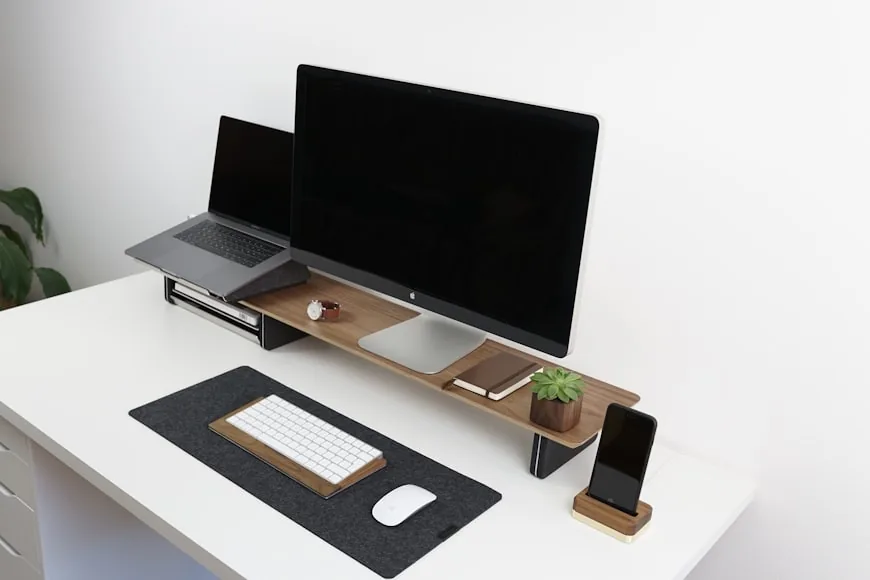

Most people start shopping for a monitor arm or a monitor riser for the same reason: the screen feels wrong.
Usually that feeling gets described as "too low," but that is only part of the problem. A monitor can feel wrong because it is too low, too close, too far away, too fixed in one position, or sitting on a bulky stand that eats usable desk depth.
That is why the comparison matters.
The official ergonomics guidance from sources like OSHA and Mayo Clinic stays fairly consistent on the basics:
the monitor should sit directly in front of you; the screen should usually be about an arm's length away; the top of the screen should be at or slightly below eye level.
Once you accept those three points, the practical difference becomes clearer:
a monitor riser mostly fixes height; a monitor arm fixes height, distance, and placement flexibility.
So if the real problem is posture, the better choice depends on whether you only need lift or whether you need the monitor to move in a more meaningful way.
Quick answer
choose a monitor arm if your desk is shallow, your monitor stand is bulky, you switch between sitting and standing, or you need better control over screen distance; choose a monitor riser if your monitor is already at a comfortable distance and you mainly need simple height lift plus a cleaner surface underneath.
That is the short version.
The longer version is that a monitor arm is usually the more capable posture tool, but it is not automatically the better purchase for every desk.
What both options can improve
Both a riser and a monitor arm can help you get the screen higher.
That matters because OSHA's computer workstation guidance says the top of the screen should be at or below eye level, and Mayo Clinic gives a very similar recommendation: place the screen directly in front of you, about an arm's length away, with the top at or slightly below eye level.
That means both tools can help if your current monitor sits too low on its original stand.
Both options can also help reduce the habit of dropping your chin and staring downward for long periods. If the monitor is too low, the neck and upper back often do extra work even when the rest of the desk setup seems reasonable.
So this is not a case where one category is useless and the other is correct.
Both can improve posture.
The question is whether the posture problem is only about height or about height and depth together.
When a monitor arm is the better posture tool
If the goal is pure ergonomic control, a monitor arm is usually the stronger option.
That is not because monitor arms are automatically more "premium." It is because they can solve more of the actual placement variables that posture depends on.
A good monitor arm can:
raise the screen; move it farther back or closer; fine-tune side-to-side position; angle the monitor more precisely; adapt more easily to sitting and standing changes.
That matters because official guidance does not only care about monitor height. It also cares about distance. OSHA says a preferred viewing distance is generally between 20 and 40 inches, and Mayo Clinic simplifies that into the familiar arm's-length rule.
This is the practical consequence of that guidance:
If both height and distance matter, the tool that adjusts both is usually more useful than the tool that adjusts only one.
That is why monitor arms tend to win for:
shallow desks; sit-stand desks; dual-monitor setups; larger displays; desks where the original stand pushes the screen too far forward.
On a smaller desk in particular, a monitor arm can reclaim space that a normal monitor stand keeps occupied. That often makes the whole setup feel calmer, not just more adjustable.
If you want the product side of that decision, Monitor arms that work on small desks goes deeper into fit, clamp range, and arm selection.
When a monitor riser is the better posture choice
A monitor riser is the better buy when the setup already works reasonably well and the missing piece is simple height.
That is the scenario many people actually have:
the monitor is already far enough away; the desk is deep enough; the screen is centered correctly; the user just needs the display lifted a bit.
In that situation, a riser can be the cleaner and less complicated fix.
A good riser can:
bring the monitor to eye level; create under-screen storage; avoid clamps, tension adjustment, and VESA mounting; keep the setup visually simple.
That can be a better real-world choice if you do not want extra hardware attached to the desk or if your monitor stand already has a compact footprint.
This is also why risers remain a sensible posture tool even though they are less adjustable. They still solve a legitimate problem: a screen that is too low.
If your monitor distance already feels comfortable, a riser may do exactly what you need without adding complexity.
For the product side of that category, Monitor risers that improve posture and desk organization is the cleaner follow-up.
When a riser stops being the right fix
The biggest weakness of a monitor riser is that it cannot fix depth in any meaningful way.
If your screen is too close because:
the desk is shallow; the monitor stand is deep; the keyboard is crowding the front edge; the panel needs to sit farther back.
then a riser can actually become the wrong solution.
It may raise the screen to a nicer height while leaving the monitor too close to your face. In some setups, it can make the problem feel worse because the screen is now higher but still stuck in the same forward position.
That is why people sometimes buy a riser, feel briefly pleased that the monitor looks more "ergonomic," and then still end up with neck or shoulder tension.
The height improved. The overall placement did not.
If your desk is only 24 inches deep, that exact problem shows up faster. Do you need a monitor riser on a 24-inch deep desk? is the more specific version of this decision.
This is also where How deep should a desk be for one monitor vs two? starts to matter. A shallow desk changes the comparison in favor of an arm very quickly.
When a monitor arm is more hardware than help
Monitor arms are more capable, but they are not automatically the right answer either.
An arm becomes a bad choice when the setup does not support it well.
Common reasons:
the monitor does not use a compatible VESA mount; the desk edge is too thick, too fragile, or blocked by a rear rail; the arm does not support the monitor's actual weight; you do not need the extra adjustment and would rather keep the setup simpler.
Arms also ask more from the user. You have to care about clamp fit, weight range, and installation. If you buy the wrong arm for the desk or screen, it can become a frustrating piece of hardware instead of a posture upgrade.
So while an arm is usually the more ergonomic tool in theory, that only helps if it actually fits the desk and monitor correctly.
Which one is better for common setups?
Use this shortcut:
Small or shallow desk
Choose a monitor arm.
It is usually better because depth is often the limiting factor, not just height.
Deeper desk with one normal monitor
Choose a monitor riser if the monitor already sits at a comfortable distance and mainly needs lift.
Choose an arm if the stand feels bulky or you want more flexibility.
Sit-stand desk
Choose a monitor arm.
Changing between sitting and standing usually rewards the extra height and position control.
Dual-monitor setup
Choose a monitor arm in most cases.
Dual screens usually demand more deliberate placement, and arms make that much easier.
Setup where storage matters as much as ergonomics
Choose a monitor riser.
The under-monitor storage space is a real advantage, especially on desks that need to hold notebooks, chargers, or small accessories.
Common buying mistakes
These mistakes show up over and over:
1. Buying a riser when the real problem is distance
If the screen already feels too close, lifting it higher does not solve the important part.
2. Buying an arm without checking fit
The desk clamp range, VESA compatibility, and monitor weight matter more than brand hype.
3. Trying to fix the screen before fixing the sitting position
Monitor placement only works properly when your chair height, elbow position, and keyboard placement already make sense.
That is why How high should your monitor be for good posture? still matters no matter which category you choose.
4. Treating desk organization and ergonomics as the same thing
They overlap, but they are not identical.
A riser may look cleaner. An arm may be more adjustable. The right decision depends on which problem you are actually trying to solve.
Bottom line
If you only need to lift the monitor and your screen already sits at a comfortable distance, a monitor riser is often the better buy. It is simpler, cleaner, and usually enough.
If your desk is shallow, your monitor stand is eating space, or you need better control over height and distance together, a monitor arm is usually better for posture.
That is the most honest way to frame it:
riser for simple height correction and under-monitor storage; arm for deeper ergonomic control and better use of tight desk space.
For posture alone, the monitor arm usually wins.
For simplicity, lower setup friction, and desks that already have enough depth, the riser still makes a lot of sense.