
The honest answer is:
sometimes yes, but only if your 24-inch desk already gives you enough monitor distance.
That is the part people skip.
A monitor riser is useful when the problem is simple height. It becomes the wrong tool when the real problem is that the screen already sits too close on a shallow desk.
That is why a 24-inch deep desk changes the decision.
Twenty-four inches is often a workable minimum for a modern flat-panel monitor, but it is not generous. Once the monitor stand, keyboard, mouse, and a little front-edge comfort all have to share that depth, there is not much room left for mistakes. A riser can help if it lifts the screen without pushing the setup forward. It can also make the desk feel worse if it adds bulk and steals the little breathing room you had.
The official ergonomics guidance from OSHA, Mayo Clinic, and Cornell stays consistent on the basics:
the screen should sit directly in front of you; the top of the screen should be at or slightly below eye level; the monitor should usually be about an arm's length away.
The riser decision is really just an application of those three points.
Quick answer
You probably do need a monitor riser on a 24-inch desk if:
your monitor distance already feels acceptable; the screen is clearly too low on its original stand; the monitor stand footprint is fairly compact; you want under-screen storage without adding a clamp-on arm.
You probably do not need a monitor riser if:
the screen already feels too close; the monitor stand is bulky and eats a lot of front-to-back space; you use a 27-inch or larger display and already feel crowded; you really need the monitor to move farther back, not just higher.
That is the short version.
Why 24 inches changes the decision
On a deeper desk, a monitor riser is often a straightforward choice.
On a 24-inch desk, the answer gets more conditional because depth is already tight enough that the monitor's footprint matters almost as much as its height.
This is the practical reality:
the keyboard needs space near the front edge; your wrists and forearms need a little room too; the monitor stand usually takes several inches of depth; the screen still needs to sit far enough away to feel calm.
If the panel already lands close to your face, putting it on a riser does not solve the important problem. Sometimes it makes the setup look cleaner while leaving the viewing distance just as compromised.
That is why 24 inches is not "too shallow for every riser." It is just shallow enough that you have to be honest about what the riser is fixing.
If you have not already worked through the broader sizing question, How deep should a desk be for one monitor vs two? is the better starting point.
When a monitor riser is still the right move
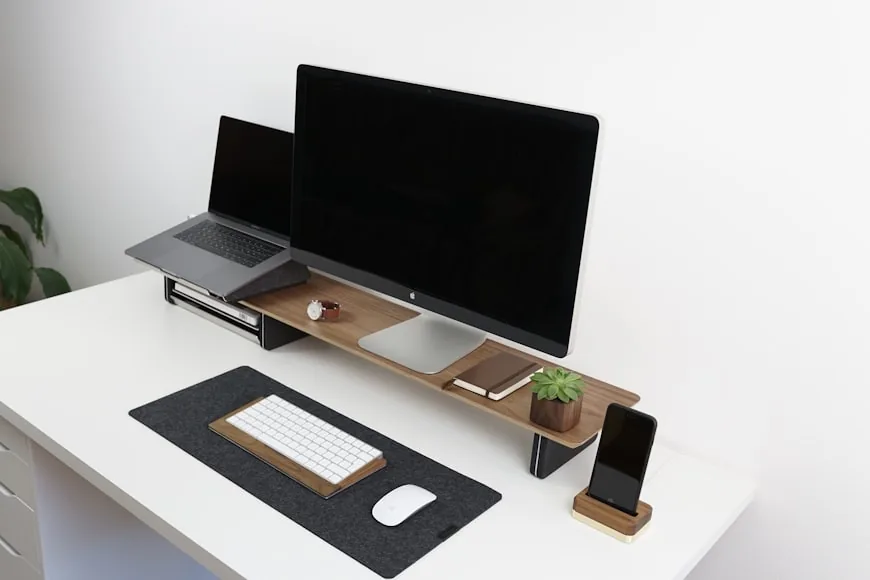
A monitor riser is useful when the setup is fundamentally close to correct and mainly needs lift.
That usually looks like this:
your shoulders are relaxed; the keyboard position is workable; the monitor does not feel aggressively close; the top of the screen is still too low.
In that situation, a riser can do three helpful things:
- Raise the screen into a more natural viewing zone.
- Create storage under the monitor.
- Keep the setup simpler than a monitor arm.
That can be a very good trade on a 24-inch desk, especially if:
the monitor is 24 inches; the stand is not very deep; you only need a modest height lift; you want a cleaner surface without extra hardware.
This is where risers still make a lot of sense. Not every shallow desk needs a monitor arm. Some just need a screen that sits a little higher and a little tidier.
When a riser becomes the wrong fix
This is the part that matters more.
If the screen already feels too close, a riser is usually the wrong category.
That happens more often on 24-inch desks because the monitor stand already consumes a meaningful share of the depth. If you then add a riser with its own legs, shelf, or drawer footprint, you may not gain any real distance at all. In some cases, the usable keyboard area feels even tighter.
This is the classic bad purchase pattern:
the user sees that the monitor is a little low; buys a riser; the screen ends up higher but still too close; neck and shoulder discomfort do not really improve.
That is not a riser failure.
It is a diagnosis failure.
The screen did not need more height first. It needed better placement.
If that sounds like your desk, the better follow-up is usually Monitor arm vs monitor riser: which is better for posture? or Monitor arms that work on small desks.
When the answer is probably yes
The clearest sign is this:
the monitor feels low, but not crowded.
That means:
you can sit back in the chair without feeling like the screen is in your face; the text is readable without leaning forward; the monitor stand is not forcing the panel too far toward you; you mainly want the top of the screen higher.
That is a great riser setup.
In that case, the riser is doing exactly what it should do: simple height correction.
When the answer is probably no
The clearest sign is the opposite:
the monitor feels low and too close at the same time.
That usually shows up as:
you want the screen farther back; the desk already feels visually crowded; the stand footprint annoys you; a 27-inch monitor feels dominant on the desk; you keep pushing the keyboard forward to make room.
That is not really a riser problem anymore.
That is a placement problem, and a monitor arm is better because it can change both height and depth.
Cornell's workstation guidance is especially useful here because it treats distance and screen placement as part of one posture system, not separate tweaks. If the monitor should sit about an arm's length away and you cannot get there comfortably on the current stand, a riser is often just solving the less important half of the issue.
Screen size changes the answer fast
Desk depth and monitor size are tightly connected.
On a 24-inch desk:
a 24-inch monitor is usually the easiest match for a riser; a 27-inch monitor can still work, but the stand footprint matters much more; a 32-inch display or tall ultrawide often pushes the decision toward an arm or a deeper desk.
That is not because large screens automatically need an arm. It is because larger screens usually feel better with a little more distance, and a 24-inch surface does not give away much extra room.
So the bigger the screen gets, the less forgiving the riser decision becomes.
Stand footprint matters as much as riser height
This is one of the most overlooked variables.
Two monitors of the same size can behave very differently on a 24-inch desk depending on the stand.
A compact stand leaves room for:
a shallow riser; better keyboard position; more comfortable viewing distance.
A bulky stand does the opposite:
pushes the monitor forward; crowds the riser platform; reduces usable desk depth before you even start working.
That is why measuring only the screen size is not enough. On a shallow desk, the real question is where the front of the monitor panel ends up once the stand and riser are in place.
A simple two-minute test before you buy
If you are trying to decide quickly, do this:
- Sit back in your chair in a supported position.
- Put your hands where they normally rest on the keyboard.
- Check whether the monitor already feels too close.
- Notice whether you are mainly looking downward at the screen.
- Imagine the monitor in the same front-to-back position, only higher.
If that imagined version sounds better, a riser is probably reasonable.
If it still sounds cramped, a riser is probably not solving the right problem.
That test is simple, but it gets to the point faster than staring at product listings.
What kind of riser still makes sense on a 24-inch desk
If the answer is yes, the best riser style is usually:
shallow front-to-back footprint; enough width for your current monitor stand; just enough height, not a giant platform; stable enough that the screen does not wobble.
This is one of those cases where "smaller but better matched" beats "bigger and more feature-rich."
Large organizer risers with drawers can be useful, but on a 24-inch desk they can also overtake the surface quickly. A simpler platform often works better unless the desk is already very controlled and clutter-light.
If you want the product-side shortlist, Monitor risers that improve posture and desk organization is the direct follow-up.
When a riser helps more than people expect
There is one case where a riser can be surprisingly good on a 24-inch desk:
when the screen distance is already okay, but the stand is low and the desk needs storage.
In that situation, the riser is doing double duty:
lifting the screen; opening useful under-monitor space for a keyboard, notebook, or small accessories.
That can make a compact desk feel calmer rather than more crowded.
So this is not an anti-riser article.
It is just a reminder that on a shallow desk, a riser has to earn its place by improving the real constraint, not just looking ergonomic.
Bottom line
On a 24-inch deep desk, a monitor riser is a good idea when your monitor already sits at a comfortable distance and mainly needs more height.
It is a bad idea when the screen already feels too close, the stand is bulky, or the desk is so tight that height without extra depth control does not actually improve comfort.
That is the cleanest way to decide:
yes to a riser if the problem is mostly height; no to a riser if the problem is height plus crowding; choose an arm instead if the monitor needs to move back, not just up.
Related reading
- How far should a monitor be from your eyes on a small desk?
- How deep should a desk be for one monitor vs two?
- How high should your monitor be for good posture?
- Monitor arm vs monitor riser: which is better for posture?
- Monitor risers that improve posture and desk organization
- Monitor arms that work on small desks
- How to set up one monitor and a laptop on a small desk