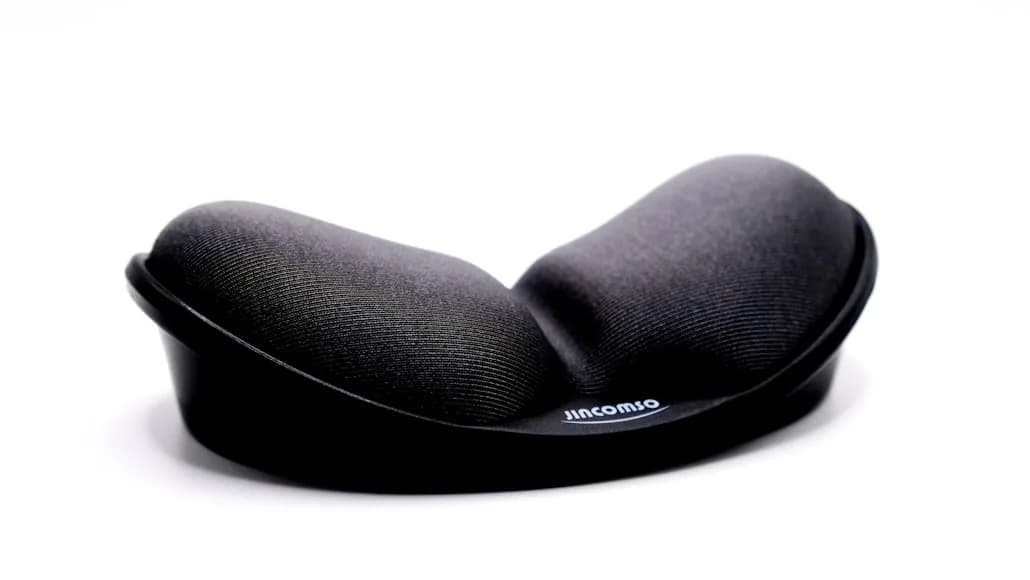

Wrist rests are one of those desk accessories that get recommended far too casually.
Sometimes they help. Sometimes they just make a bad keyboard setup feel more expensive.
That is why this category needs a little more discipline than the average “best desk accessories” list.
OSHA’s workstation guidance is actually pretty clear here:
a wrist or palm support can increase comfort; it should match the keyboard’s front edge in width, height, slope, and contour; it should be soft but firm; it should be at least 1.5 inches deep; and its use should be minimized while actively keying.
That last point matters.
A wrist rest is not supposed to force your wrists upward all day. It is supposed to give the heel of the palm a better resting surface between active typing and mousing tasks, while the rest of the workstation still supports a neutral arm and wrist position.
On compact desks, fit matters even more because a wrist rest that is too deep, too tall, or too wide can:
push the keyboard too close to the desk edge; steal mouse space; make the whole setup feel smaller.
This shortlist stays focused on wrist rests that actually make sense for tighter setups, smaller keyboards, or cleaner work zones.
- premium low-profile pick: Logitech MX Palm Rest
- Strong fit for slim compact keyboards: Kensington ErgoSoft Wrist Rest for Slim Compact Keyboards
- Strong fit for compact mechanical keyboards: HyperX Wrist Rest Compact 60% / 65%
- Strong fit for higher-profile TKL boards or larger laptops: Grifiti Fat Wrist Pad 14
How we narrowed the list
This category only makes sense when the wrist rest matches the keyboard and the desk.
For a compact setup, that meant prioritizing:
widths that actually match smaller keyboards instead of forcing a full-size footprint; front height and depth that do not crowd the keyboard edge or mouse zone; materials firm enough to support the heel of the palm without turning mushy; clear official sizing so the fit call is based on something more useful than marketing copy.
That is why the picks split by keyboard profile and layout. On a tight desk, the wrong wrist rest becomes a space problem almost immediately.
A slim, wide palm rest that fits low-profile keyboards well without taking over the front half of a compact desk.
- 420 mm wide with a slim 8 mm profile
- Firm support with a smooth surface
- Works best with low-profile full-width keyboards
A narrower ergonomist-approved gel wrist rest sized specifically for slim compact layouts instead of full-size boards.
- 281 mm wrist-rest width
- Designed for slim compact keyboards under 10 mm front height
- Gel-cushioned padding with soft exterior
A compact gel-infused wrist rest with a non-slip base and stitched edges for small mechanical keyboard setups.
- 318 mm wide and 88 mm deep
- Cool gel-infused memory foam
- Anti-slip rubber base and anti-fray stitching
A thicker neoprene wrist pad that makes more sense for taller keyboards or laptop users who need more front-edge support.
- 14 x 4 x 0.75 inches
- Neoprene core with washable nylon surface
- Available in narrower 2.75-inch width too
What matters most on a compact desk
The wrong wrist rest usually fails in one of three ways:
it is too tall for the keyboard; it is too deep for the desk; it is too wide for the layout you actually use.
That is why “best wrist rest” is not a very useful question on its own.
The better question is:
which wrist rest matches the keyboard and the amount of desk space you are actually working with?
On a compact setup, the right wrist rest should:
sit naturally against the front of the keyboard; avoid forcing wrist extension; leave enough mouse space beside the keyboard; stay proportional to the actual keyboard width.
That is also why compact desks and compact keyboards often work better with narrower or slimmer palm rests than with generic full-width padded slabs.
1. Logitech MX Palm Rest
The Logitech MX Palm Rest is the cleanest pick here if your keyboard is already low-profile and you mainly want a calmer resting surface instead of a thick elevation change.
Logitech’s official MX Palm Rest product page frames it as a premium palm rest with a sturdy support and smooth surface for all-day comfort. Logitech’s official MX Keys Combo for Business specs also list the palm rest at 420 mm wide, 64 mm front-to-back, and 8 mm thick.
That profile matters a lot for compact setups.
This is not a bulky memory-foam block trying to rescue a tall mechanical board. It is a slimmer support designed to pair with low-profile keyboards where the main goal is:
cleaner hand support; less front-edge pressure; a lower-visual-weight accessory.
That makes it especially sensible if your desk is already carrying:
a low-profile full-width keyboard; a mouse; maybe a laptop or notebook on one side.
You get support without sacrificing too much of the front-to-back desk footprint.
Strong fit for: slim full-width keyboards and cleaner minimalist desks.
Main tradeoff: it is not the right pick for tall mechanical boards that need a thicker support.
2. Kensington ErgoSoft Wrist Rest for Slim Compact Keyboards
The Kensington ErgoSoft Wrist Rest for Slim Compact Keyboards is the most targeted option in this group.
That is why it earns a spot.
Kensington’s official ErgoSoft range documentation lists the slim compact version as:
designed for slim compact keyboards; intended for boards with a front depth under 10 mm; 281 mm wide; gel cushioned; finished with an ultra-soft exterior.
That width is the important part.
Many wrist rests are simply too wide for smaller layouts. On a compact desk, that creates unnecessary spread and can make the whole front edge of the setup feel busier than it needs to be. Kensington’s slim compact model is more disciplined. It is built to fit the narrower footprint instead of pretending every keyboard deserves a full-size rest.
This is the cleaner answer for:
60%; 65%; 75%; compact wireless boards; Mac-style slim layouts.
Strong fit for: users with slimmer compact keyboards who want a right-sized gel palm rest instead of a generic one.
Main tradeoff: too narrow for full-size keyboards and not thick enough for taller mechanical boards.
3. HyperX Wrist Rest Compact 60% / 65%
The HyperX compact wrist rest is the strongest choice here if you are using a compact mechanical keyboard and want a clearer cushion-first option.
HyperX’s official specs list:
318 mm width; 88 mm depth; cool gel-infused memory foam; anti-slip natural rubber underside; anti-fray stitching; a 2-year warranty.
That gives it a slightly different personality from the Kensington.
Where Kensington is more about matching slim compact keyboards, HyperX is more about supporting compact mechanical setups that usually sit taller and feel harsher at the front edge.
It is still compact enough to make sense on a smaller desk, but it offers a more substantial landing area than the slimmer Logitech or Kensington options.
That makes it a better fit if you:
type on a taller board; want more cushioning; need something that stays put; do not want a full-width wrist rest sprawling across the desk.
Strong fit for: compact mechanical keyboard users who want more cushion and a more stable feel.
Main tradeoff: deeper and chunkier than the slimmest options, so it needs a little more desk depth.
4. Grifiti Fat Wrist Pad 14
The Grifiti Fat Wrist Pad 14 is the right pick here when the keyboard is higher-profile, the laptop is large, or the usual slim wrist-rest advice simply does not match the setup.
Grifiti’s official product page lists the core version at:
14 x 4 x 0.75 inches; neoprene core; washable nylon surface; non-skid base.
It also offers a narrower 2.75-inch width version, which is genuinely useful on tighter desks.
That flexibility is what makes it stand out.
This is not the pick for someone trying to keep a desk ultra-minimal. It is the pick for someone whose keyboard is tall enough that a slim palm rest just is not doing much. It can also make practical sense for laptop users who need a more forgiving front edge while typing with an external keyboard nearby.
The important nuance is that this product works best when you actually need more height and cushion. If your keyboard is already low-profile, the Grifiti may simply be too much.
Strong fit for: taller TKL boards, standard-height mechanical keyboards, and some large-laptop or keyboard-drawer situations.
Main tradeoff: thicker visual and physical footprint than the other options here.
Do you actually need a wrist rest?
Sometimes yes.
Sometimes absolutely not.
OSHA’s guidance is useful here because it avoids the usual hype. Wrist or palm supports can improve comfort, but they are supposed to work as part of an ergonomically coordinated setup, not instead of one.
You probably benefit from a wrist rest when:
the keyboard’s front edge creates pressure on the palms; you need a softer resting surface between typing bursts; the rest can match the keyboard height without bending the wrists upward; the desk has enough depth to fit the rest without crowding the mouse.
You probably do not need one when:
the keyboard is already low enough and the desk edge is comfortable; the rest is only compensating for a desk that is too high; the rest is so tall that it increases wrist extension; it pushes the keyboard and mouse into a cramped front-edge position.
That is why a wrist rest is usually a refinement tool, not a rescue tool.
If the keyboard, desk, and chair relationship is wrong, solve that first.
The compact-desk problem most people miss
A wrist rest can improve comfort and still make a compact desk worse if it steals too much space from the working zone.
That usually happens when:
the pad is too deep; the pad is much wider than the keyboard; the mouse no longer fits naturally beside the board; the keyboard gets pushed too close to the desk edge.
This is why compact desks reward narrower, better-matched accessories instead of “more padding.”
The wrist rest should support the keyboard zone, not become its own furniture.
If the front half of the desk already feels crowded, How to set up a small desk without losing usable space is the better place to start before buying anything.
Which one should you actually buy?
Use this shortcut:
choose Logitech MX Palm Rest if you use a low-profile full-width keyboard and want the cleanest premium support; choose Kensington ErgoSoft Wrist Rest for Slim Compact Keyboards if your board is genuinely compact and slim; choose HyperX Wrist Rest Compact if you use a 60% or 65% mechanical keyboard and want more cushion; choose Grifiti Fat Wrist Pad 14 if your keyboard is taller and slimmer rests keep feeling too low.
That is the practical split.
The best wrist rest for a compact setup is not the one with the most padding. It is the one that matches the keyboard height and width without making the desk feel smaller.
Bottom line
The best wrist rest for a compact setup is the one that helps the keyboard zone feel calmer without creating a new problem beside it.
If you use a low-profile keyboard, Logitech is the cleaner premium answer. If you use a slim compact layout, Kensington is the sharper fit. If you run a compact mechanical keyboard, HyperX is the more sensible cushion-first choice. And if your keyboard is taller or harder-edged, Grifiti is the better thick-pad option.
That is a better way to buy this category than assuming every wrist rest helps every desk.