
Desk mats get recommended too casually.
On a large desk, that is mostly harmless. On a compact setup, it is not.
A desk mat can make a small desk feel more intentional, quieter, and easier to use. It can also do the opposite. A mat that is too deep, too wide, too thick, or too visually heavy can steal exactly the surface space a compact setup was trying to preserve.
That is the real buying filter here.
For a smaller desk, the best desk mat is usually not the one that covers the most area. It is the one that defines the working zone cleanly without crowding the keyboard, mouse, notebook, and monitor relationship.
This roundup stays focused on current official specs from brands with clearly documented materials and sizes. The goal is not to collect the fanciest desk mats on the internet. The goal is to identify the few mats that make practical sense when the desk itself is already size-constrained.
- overall desk mat for compact setups: Orbitkey Desk Mat Slim
- budget desk mat: Logitech Desk Mat Studio Series
- premium narrow felt mat: Grovemade Wool Felt Desk Pad (Small)
- natural-feel compact mat: Oakywood Felt&Cork Desk Mat (62 x 30 cm)
How we narrowed the list
The point here was not to collect the most stylish mats. It was to find the mats that still behave well when the desk is already short on room.
For this roundup, we prioritized widths and depths that do not eat the entire front half of a compact desk, materials with clearly documented specs instead of vague lifestyle branding, shapes that still work with smaller keyboards and tighter mouse zones, and a small number of useful extras like cable control or a more defined writing zone.
That is why the list leans toward slimmer mats and tighter footprints instead of giant full-desk pads.
A compact-format desk mat that adds more than surface protection, with a document hideaway, magnetic cable holder, and a shape that fits smaller desks better than oversized pads.
- 800 x 310 x 4.9 mm format
- Document hideaway and magnetic cable holder
- Premium vegan leather with recycled PET felt backing
A simple, compact cloth desk mat with the right base specs for everyday use and none of the oversized footprint that makes small desks harder to manage.
- 700 x 300 mm footprint
- 2 mm thickness with anti-slip base
- Spill-resistant design and 2-year warranty
A felt-and-cork desk mat with a more organic material mix, a compact 62 x 30 cm size option, and enough grip to stay planted on smaller desks.
- Compact size option: 62 x 30 cm
- Merino wool felt with Portuguese cork base
- 5-year warranty
What actually matters on a small desk
The biggest mistake is thinking of a desk mat as neutral.
It is not neutral.
On a compact desk, the mat decides where the working zone begins and ends. That means the buying questions are different from a “big desk aesthetics” setup.
These are the specs that matter most: front-to-back depth (enough room for the keyboard, mouse, and notebook without forcing them forward), width (defines the core work area without turning the whole desk into one giant mat), surface feel (writing comfort, mousing glide, or mostly visual zoning), base grip (stays put on a crowded desk), and extra function (cable control, note storage, or easier cleanup).
That is why compact setups often do better with narrower mats than larger ones. A full-coverage desk mat can look polished, but it also reduces flexibility if the desk needs to support multiple modes of use.
If you are still trying to make the whole desk layout work, start with How to set up a small desk without losing usable space. The mat should support that layout, not try to replace it.
1. Orbitkey Desk Mat Slim
Orbitkey Desk Mat Slim is the strongest overall pick because it is one of the few mats clearly designed around compact work areas instead of full desktop coverage.
Orbitkey's official product page positions it around the exact problems smaller desks run into: a document hideaway for loose notes and papers, a magnetic cable holder, anti-slip backing, reversible orientation for right- or left-handed layouts, and materials listed as premium vegan leather with 100% recycled PET felt backing.
It also uses a compact 800 x 310 mm footprint, which is why it makes more sense for this article than a larger statement mat.
That size is important. It is wide enough to support a keyboard-and-mouse zone cleanly, but shallow enough that it does not automatically dominate the whole surface. That is a much better balance on desks where every inch of front-to-back depth matters.
The added paper and cable control features also matter more on compact desks than on larger ones. A mat that can absorb a couple of loose notes and keep one charging cable in place is doing real work, not just acting as a visual layer.
Strong fit for: small desks where you want one accessory to define the work area and quietly reduce paper and cable drift.
Main tradeoff: price. This is much more of a designed organizer mat than a simple surface pad.
2. Logitech Desk Mat Studio Series
Logitech Desk Mat Studio Series is the clean budget answer because it stays disciplined.
Its official current product page gives a straightforward spec profile:
700 x 300 mm; 2 mm thickness; anti-slip base; spill-resistant design; anti-fraying stitches; 2-year limited hardware warranty.
That is a very practical size for compact setups. It gives enough width for a keyboard and mouse without becoming a full desk-covering layer, and the 2 mm thickness keeps it low-profile.
This is the desk mat to choose when you want a better mousing surface, a cleaner visual boundary for the work zone, simple desk protection, and the lowest-friction price point in the group.
It is not trying to do storage or organization tricks. That is actually part of the appeal. Many smaller desks benefit from accessories that stay quiet and predictable.
Strong fit for: buyers who want a simple desk mat that fits a compact setup without turning into a project.
Main tradeoff: it does not add storage, note control, or any special compact-desk functionality beyond the right size and basic materials.
3. Grovemade Wool Felt Desk Pad (Small)
The Grovemade Wool Felt Desk Pad earns its spot because it is unusually well-suited to very tight desks.
Grovemade's official page is refreshingly explicit here. The Small size is listed at:
11" x 24.75"; 3.5 mm thick; made from premium German Merino Wool Felt; finished with a vegetable tanned leather tab.
Grovemade also shows the small pad sliding under its desk shelf system and positions it as a mat for an external keyboard and mouse rather than a whole-desk pad. If that kind of layered setup is what you are building, Desk shelves that work on small desks is the cleaner follow-up.
That is the right lane for compact setups.
This is not the mat you buy when you want full-surface coverage or a firmer writing surface. In fact, Grovemade specifically notes that this felt pad is not designed to be used as a writing surface. But for smaller desks, that narrow use case can be a strength. It keeps the mat tightly scoped to the part of the desk where the keyboard and mouse actually live.
Strong fit for: tight workstations where you want a narrow premium desk mat that stays in the keyboard-and-mouse lane.
Main tradeoff: felt is not the best choice if your main priority is writing feel or spill resilience.
4. Oakywood Felt&Cork Desk Mat
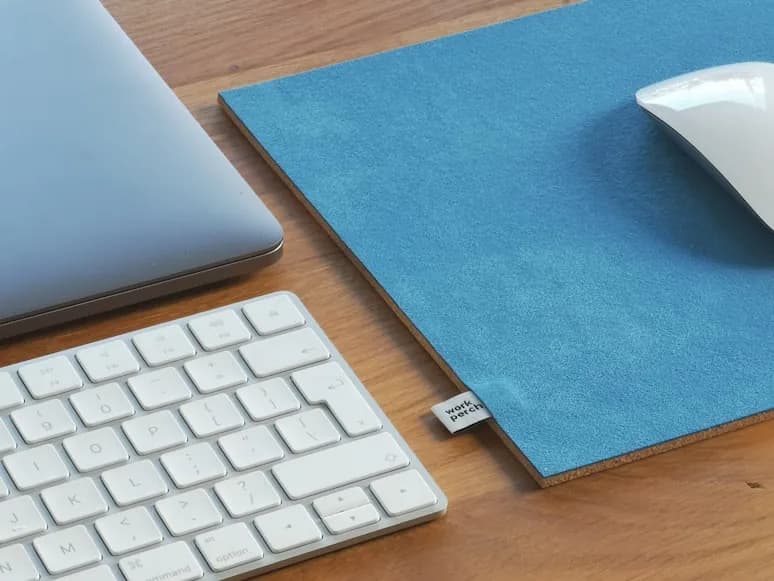
Oakywood's Felt&Cork Desk Mat is the best natural-feel option in the group because the material mix is doing something useful, not just sounding premium.
Oakywood's official page lists:
a compact 62 x 30 cm size option; Merino wool felt; Portuguese cork; a 5-year warranty.
The product page also explains the material logic clearly. The wool felt absorbs moisture without retaining odors, while the cork base adds cushioning and grip.
That makes it one of the more balanced soft-surface mats for compact desks. It is not as feature-rich as Orbitkey and not as stripped-down as Logitech. The value here is the material behavior:
softer feel than a plain cloth mat; more grip than felt alone; a compact footprint that still feels intentional.
It is a particularly good fit for desks that need a calmer visual texture without going fully into lifestyle-object territory.
Strong fit for: buyers who want a more natural material feel and a compact size without giving up stability.
Main tradeoff: it does less active organization than Orbitkey and costs more than simpler mats.
Which one should you actually buy?
Use this shortcut:
choose Orbitkey Desk Mat Slim if you want the smartest all-around compact desk mat with cable and note control built in; choose Logitech Desk Mat Studio Series if you want the simplest affordable mat that still fits small desks well; choose Grovemade Wool Felt Desk Pad (Small) if your desk is especially tight and you want a narrow premium pad just for keyboard and mouse use; choose Oakywood Felt&Cork Desk Mat if you want natural materials, soft feel, and better grip in a compact format.
That is the practical split.
The real question is not which desk mat is “best” in the abstract. It is which mat does the least damage to the usable footprint of the desk while still improving how the setup feels.
When a desk mat actually helps a compact setup
A desk mat usually helps when:
the desk needs a clearly defined work zone; the mouse feels better on a softer surface; the keyboard and mouse tend to drift visually into clutter; the desk is used for both computer work and light notebook use.
A desk mat usually hurts when:
the desk is already too shallow; the mat is so deep that it forces the keyboard toward the front edge; it becomes one more decorative layer with no functional role.
That is why compact setups usually benefit more from disciplined mat sizing than from premium materials alone.
Bottom line
The best desk mat for a compact setup is not the biggest one or the most dramatic one.
It is the one that defines the work zone without stealing too much of it.
If you want the strongest overall compact-desk pick, start with Orbitkey Desk Mat Slim. If you want the simplest budget-friendly answer, Logitech Desk Mat Studio Series is the cleanest choice. If your desk is especially tight, Grovemade Wool Felt Desk Pad (Small) is the sharper premium option. And if you want a more natural felt-and-cork feel, Oakywood Felt&Cork Desk Mat is the better fit.
That is a much better way to shop this category than assuming every desk mat improves every desk equally.