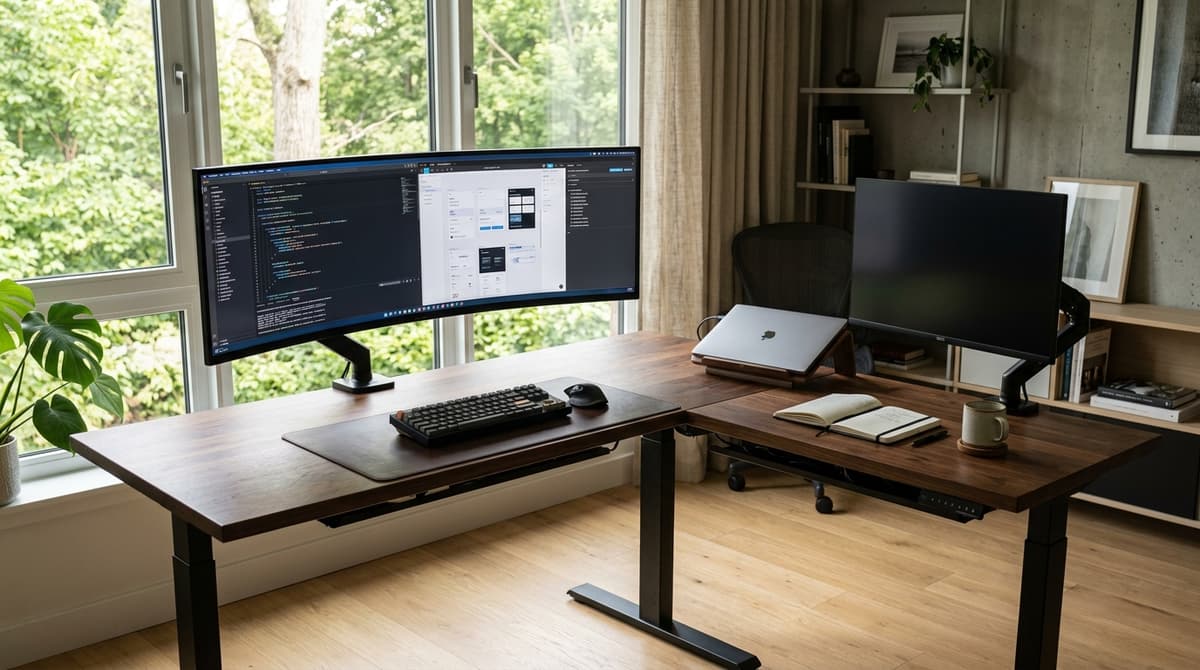

This is not a debate about interior decorating. It is an engineering tradeoff between how much wall space you can sacrifice and how much punishment your spine takes from your monitors.
Most people buy a corner desk because they think it creates free room out of nowhere. What they usually get is an awkward dust collector in the corner, blocked heating vents, and a room that suddenly feels like a corporate cubicle.
Yet for someone juggling two separate computers, heavy audio gear, or a massive 49-inch curved screen, a straight rectangular desk is an ergonomic trap. Spreading screens flat across a straight desk forces you to twist your neck and lower back all day long. No ergonomic chair can save you from that.
A desk that looks huge in an empty room can turn into a 4-square-foot black hole the moment you mount your screens.
Here is the real math, the spine biomechanics, and the motor engineering that explain when an L-shaped desk actually fixes your setup, and when a straight desk is the smarter move.
1. The wall perimeter math (where corner desks trick you)
The biggest surprise with corner desks is how much wall space they burn compared to what you can actually reach with your hands.
Let's look at a standard symmetrical L-shaped desk measuring 60 by 60 inches (152.4 by 152.4 cm) with a standard depth of 30 inches (76.2 cm) on both wings.
The moment you slide that desk flush into a 90-degree corner, it locks down 120 linear inches (3.05 meters) of wall space—5 feet on Wall A, and another 5 feet on Wall B.
A straight rectangular desk of the exact same size (60 by 30 inches) consumes only 60 linear inches (1.52 meters) along one single wall. That leaves your second wall completely untouched for bookshelves, rolling storage cabinets, a lounge chair, or simple door clearance.
Straight Desk (60" x 30")           Symmetrical L-Desk (60" x 60")
Consumes 60" of Wall A             Consumes 60" of Wall A + 60" of Wall B
┌────────────────────────┐         ┌────────────────────────┐
│                        │         │                        │
│      12.5 sq ft        │ 30"     │      Main Wing         │ 30"
│      usable area       │         │      12.5 sq ft        │
└────────────────────────┘         └───────────┬────────────┘
          60"                                  │  Return    │
Wall B is completely free                      │  Wing      │ 30"
for doors, storage, or walking                 │  6.25 sq ft│
                                               └────────────┘
                                                    30"
The math of the "dead corner triangle"
On paper, the L-shaped desk looks like an easy winner for surface area:
- Main wing: 60 in × 30 in = 1,800 sq in (12.5 sq ft / 1.16 m²)
- Perpendicular return wing: 30 in × 30 in = 900 sq in (6.25 sq ft / 0.58 m²)
- Total gross surface area: 2,700 sq in (18.75 sq ft / 1.74 m²)
A 60x30-inch straight desk gives you 1,800 sq in (12.5 sq ft). The L-desk seems to hand you 50% more room.
Then you mount your screens in the corner.
When you sit facing diagonally into that 90-degree corner, the distance from your stomach to the wall corner increases by the square root of two (roughly 1.414). That diagonal reach stretches out to 42.42 inches (107.75 cm). Unless you have six-foot arms, you cannot touch the back corner without standing up.
When you place a dual 27-inch setup or a 49-inch curved monitor diagonally across the apex, the screen spans a line roughly 48 inches (122 cm) wide. That screen creates an artificial wall across the corner, sealing off a deep triangular void behind it.
       Corner Apex (90°)
             /\
            /  \
           / 4.0\  Leg length: 33.94"
          /sq ft \
         /  DEAD  \
        /   ZONE   \
═══════/════════════\═══════
       ◄─── 48" ────►
     Monitor Front Width
The sides of that trapped triangle equal the screen width divided by 1.414:
Leg = 48 / 1.414 ≈ 33.94 inches (86.2 cm)
The area of that sealed-off space is:
Area = 0.5 × (33.94)² = 576 sq in = 4.0 sq ft (0.372 m²)
That is 4.0 square feet of completely unreachable surface area.
When you subtract that 4-square-foot dead zone, your real, reachable desktop shrinks from 18.75 square feet down to 14.75 square feet.
You gave up 5 extra feet of wall space to gain an effective 2.25 square feet of usable desktop. If your monitors do not span the full corner, you get what designers call the "mushroom effect"—screens sticking awkwardly out into the room while a dark cavern behind them collects dust and dropped USB cables.
2. The acoustic penalty: why your calls echo in the corner
There is an invisible problem with corner desks that almost nobody thinks about until their first Zoom call: room acoustics.
A 90-degree room corner behaves like a megaphone in reverse. When you speak toward the corner, or when desktop speakers fire toward those walls, sound waves bounce back and forth between the two hard surfaces. This creates flutter echo—that sharp, hollow ringing sound you hear on cheap conference calls.
                  Corner Apex (90°)
                       /\
                      /  \
                     /    \
Sound reflections   /  /\  \   Boundary interference
trap acoustic      /  /  \  \  amplifies bass resonance
energy            /  /    \  \
                 ▼  /      \  ▼
               [Desktop Speakers]
                        ▲
                        │ Voice emission
                     [Operator]
Acoustic engineers measure room clarity using reverberation time (RT60)—how long it takes for a sound to drop by 60 decibels after you stop talking. Sabine's formula models this relationship:
RT60 = (0.161 × V) / A
Where V is room volume in cubic meters and A is total acoustic absorption. For clean, natural voice calls, your room needs an RT60 between 0.4 and 1.1 seconds.
When your face is parked 30 inches from a hard plaster corner, your voice energy bounces right back into your microphone almost instantly. Low frequencies get trapped in the corner seam, creating standing waves where deep bass (100 to 250 Hz) sounds boomy and muddy while your speech clarity drops.
A straight desk on a flat wall lets your voice carry out into the open room instead of bouncing straight back at you. If you set up an L-shaped corner desk, plan on mounting 2-inch-thick dense acoustic panels right behind your screens to kill that echo.
3. Spine biomechanics: why straight desks hurt your neck and back
If corner desks have spatial and acoustic drawbacks, why do so many serious professionals swear by them?
Because of human biomechanics.
Ergonomists evaluate workstation layouts using the Barnes and Squires reach envelopes:
- Primary reach zone: The arc your hands trace when your elbows stay resting at your sides. This is where your keyboard and mouse belong.
- Secondary reach zone: What you can reach by extending your arms without bending your waist. This is for stream decks, reference notebooks, or coffee mugs.
- Tertiary reach zone: Anything that forces you to lean forward or twist your waist to touch.
On a wide 60- or 72-inch straight desk, spreading out dual monitors, reference binders, and a test laptop forces your gear into that tertiary zone. You spend all day leaning, reaching, and twisting.
Barnes and Squires Reach Envelopes
┌────────────────────────────────────────────────────────┐
│ [Tertiary Zone: Active waist bending & shoulder reach] │
│       ┌────────────────────────────────────────┐       │
│       │ [Secondary Zone: Full arm reach, no lean]│     │
│       │      ┌──────────────────────────┐      │       │
│       │      │  [Primary Zone: Elbows at│      │       │
│       │      │   sides, forearm sweep]  │      │       │
│       │      └───────────┬──────────────┘      │       │
└───────┴──────────────────┴─────────────────────┴───────┘
                           ▲
                       [Operator]
The neck strain trap: splenius capitis and SCM
When you run dual 27-inch monitors on a straight desk, your secondary screen usually sits 35 to 45 degrees off to one side.
Your head weighs between 10 and 12 pounds. When you turn your chin 30 degrees to the side and hold it there for hours, the muscular load on your neck doubles.
Two muscles take the hit:
- Splenius capitis: A deep neck muscle that anchors to your upper spine (C7 through T3) and attaches behind your ear at the mastoid process. It controls head extension and turning to the same side.
- Sternocleidomastoid (SCM): The thick muscle running from your collarbone up behind your ear, controlling turning and forward tilting.
       Cervical Spine Rotation Hazard (>30° Off-Axis)
                    [Mastoid Process]
                           / \
  Sternocleidomastoid     /   \   Splenius Capitis
  (SCM - Cranial Nerve XI)/     \  (C7-T3 origin)
                         /       \
                        ▼         ▼
      Chronic Trigger Points:   Referred pain, tension
      Vertigo, tinnitus,        headaches behind eyes
      wryneck muscle spasms     ("migraine mimic")
Holding your head turned to the side chokes off blood flow to these muscle fibers. Lactic acid builds up, and painful knots form.
Knots in the splenius capitis cause splenius capitis syndrome—a gnawing pain at the base of your skull that radiates around your temples and settles right behind your eyes, mimicking a bad migraine.
Knots in the SCM can pinch branches of Cranial Nerve XI, causing weird symptoms like mild dizziness, balance issues, and ringing in the ears (tinnitus).
The lower back shear trap: L4–L5 and L5–S1
Turning your neck is bad. Twisting your lower back while sitting is much worse.
When you sit down, your pelvis rolls backward and flattens the natural inward curve of your lower spine. That shifts your body weight directly onto the front edge of your lumbar discs, putting the tough outer rings (the annulus fibrosus) under heavy tension.
Inside a healthy disc, the gel core (nucleus pulposus) has a natural fluid pressure of 0.13 MPa. It handles straight vertical pressure easily.
           Seated Lumbar Shear at L4-L5 / L5-S1
               Flexed Spine + Axial Rotation
                        ┌─────────┐
                        │   L4    │
                        └────┬────┘
     Posterolateral ◄───────[===]───────► High Torsional
     Annular Shear          │   │         Shear (2.783 MPa)
     Fissuring Risk     ┌────┴────┐
                        │   L5    │
                        └─────────┘
   Disc fluid pressure drops from 0.13 MPa to 0.05 MPa;
   Stiffness increases from 0.5 MPa to 1.1 MPa (degeneration).
When you twist your seated body to type on a side laptop or write in a notebook, you combine forward flexion with axial twisting.
Spine researchers tested what happens to the lowest lumbar segment (L4–L5) under these exact conditions. Under a standard 500 N body load, adding just 10 Nm of twisting force spikes shear stress on the back-corner of the disc to 2.783 MPa:
| Seated Loading Condition (L4–L5) | Type of Force | Peak Observed Shear Stress | Real-World Consequence |
|---|---|---|---|
| Pure Vertical Compression | Straight down / Fluid | Low (under 0.3 MPa) | Easily absorbed by healthy disc fluid. |
| Pure Forward Leaning | Pulling on rear disc wall | Moderate (~0.8 MPa) | Increases disc pressure; stretches ligaments. |
| Forward Lean + Twisting | Rotational Shear on Rear Wall | Up to 2.783 MPa | Tears disc fibers, causes delamination and herniations. |
Swipe sideways to compare the full chart.
Doing this daily wears down the disc's collagen fibers. Natural fluid pressure drops from 0.13 MPa down to 0.05 MPa, while the disc stiffens from 0.5 MPa up to 1.1 MPa. The disc dries out, hardens, and eventually herniates.
How an L-desk fixes the twist: chair swivel
An L-shaped desk prevents this lower back damage because of one simple mechanical part: your chair's swivel cylinder.
Instead of twisting your lumbar spine 40 degrees to reach your second computer, you spin your chair on its 360-degree bearing. Your hips, lower back, shoulders, and head rotate together as one solid unit.
Your spine stays completely straight and neutral. The steel ball bearings in your chair eat the rotational force, completely removing that 2.783 MPa shear stress from your lower back.
4. Optical physics: why 49-inch curved screens belong in corners
How your eyes focus across multiple screens is determined by basic optical geometry.
Your eyes work best along an imaginary curve called the empirical horopter. The horopter is the circle of points in front of you that hit the exact same spots on both retinas at the same time, giving you clean depth perception with zero visual distortion.
              The Optical Horopter Curve
                    [Left Eye] [Right Eye]
                         \     /
                          \   /  Comfortable viewing distance:
                           \ /   0.68m to 0.76m (27"-30")
               ─────────────▼─────────────
              (      Empirical Horopter   )
             (   Equidistant Focal Arc     )
            (                               )
       [Outer Edge]     [Screen Center]   [Outer Edge]
       ◄─── 1500R Radius: 1.5m Equidistant Arc ───►
For desktop computer screens, clinical studies show people are most comfortable when the screen sits between 0.68 and 0.76 meters (27 to 30 inches) away.
When you put two flat 27-inch monitors next to each other on a straight desk, the outside edges of those screens sit 0.95 meters or further from your eyes.
Every time your eyes glance from the center to the outside edge, the tiny ciliary muscles inside your eyes have to stretch and reshape your eye lenses. This constant refocusing is called accommodative fatigue. By late afternoon, your eyes feel gritty, dry, and exhausted.
Why curved monitors match corner depth
Curved monitors use an "R" rating that tells you the radius of their circle in millimeters:
| Monitor Curve Profile | Curve Radius | Best Viewing Distance | What It Does Best |
|---|---|---|---|
| Flat Screen | Infinite (no curve) | Center only (0.70 m) | Zero line distortion for CAD, architecture, and print layout. |
| 1800R Curve | 1,800 mm (1.8 m) | 0.80 m to 1.20 m | Gentle curve; great for dual 27-inch setups. |
| 1500R Curve | 1,500 mm (1.5 m) | 0.65 m to 1.00 m | Matches the human eye arc; keeps screen edges equidistant. |
| 1000R Curve | 1,000 mm (1.0 m) | 0.50 m to 0.80 m | Aggressive gaming wrap; too tight for multi-window office work. |
Swipe sideways to compare the full chart.
A 1500R curved monitor bends on a 1.5-meter radius, closely matching the human horopter. The outer edges sit at the exact same distance from your eyes as the center of the panel.
This is especially critical for Vertical Alignment (VA) panel monitors, which wash out and lose contrast when viewed from an angle. The 1500R curve guarantees you look straight into every pixel at a perfect 90-degree angle.
Straight 24" Desk + 49" Curved Display:
Screen sits 18" from face -> Aggressive curve feels claustrophobic

Corner Desk Apex + 49" Curved Display:
42" corner depth swallows the bulky mount;
Screen sits at 28" (0.71m), perfectly matching your natural gaze.
If you put a massive 49-inch curved monitor on a 24- or 30-inch straight desk, the screen sits right in your face. The curve wraps around you so tightly that it feels claustrophobic and cuts off your view of the room.
In the corner of an L-shaped desk, that 42-inch diagonal depth is an asset. The monitor's heavy stand and mounting arm tuck cleanly back into the empty corner space, placing the screen right at the sweet spot of 0.71 meters (28 inches). The screen fills your peripheral vision smoothly without any plastic bezels in the middle.
5. Standing desk engineering: why 3 legs beat 2 legs
Turning an L-shaped desk into an electric standing desk is much harder than building a standard two-legged straight desk.
Commercial furniture stability is tested under the ANSI/BIFMA X5.5 standard for Desk and Table Products.
   Two-Leg Straight Desk             Three-Leg L-Shaped Desk
   Prone to Side-to-Side Sway        Orthogonal Outrigger Self-Bracing
       ┌──────────────┐                 ┌──────────────┐
       │ ◄── Sway ──► │                 │              │
       └───┬──────┬───┘                 └───┬──────┬───┘
           │      │                         │      │   ┌────────┐
           │      │                         │      │   │ Return │
           │      │                         │      └───┼───┐    │
           ┴      ┴                         ┴          │   │    │
       Wobbles under typing              Third leg     │   ┴    │
       at max height (48"+)              acts like an  └────────┘
                                         outrigger
The 50-pound BIFMA stability test
Under ANSI/BIFMA X5.5, a tester pushes the edge of the desk with a 50-pound (222 N) horizontal force while the desk is raised to its full height.
A two-legged straight desk only has two narrow steel feet. When the telescoping legs extend up to 48 or 49 inches, the tiny mechanical gaps between the sliding leg stages get magnified. When you type hard, the desk sways side-to-side and wobbles back and forth.
A three-legged L-shaped desk handles this through geometry.
Because the return wing sits at a 90-degree angle, that third lifting column acts like an orthogonal outrigger. Any sideways force against the main desk gets converted into tension and compression along the return frame.
The desk braces itself. A high-grade 3-leg L-desk passes BIFMA stability testing at maximum height with virtually zero wobble, without needing a lower crossbar that bumps your knees.
Desktop stiffness and monitor arm clamps
Desktop materials are rated by their Young's modulus (E), which measures resistance to bending:
- Solid Oak / Hardwood: E ≈ 11,000 to 12,500 MPa
- Baltic Birch Plywood: E ≈ 9,000 to 10,500 MPa
- Medium-Density Fiberboard (MDF): E ≈ 3,000 to 4,000 MPa
- Standard Particleboard: E ≈ 2,000 to 2,500 MPa
When you clamp a heavy dual-monitor arm or a 49-inch ultrawide (weighing 30 to 45 lbs with the mount) to the back edge of an MDF desk, that tiny 3x4-inch clamp plate concentrates huge twisting force into a tiny spot.
On a straight desk with a long 60- or 72-inch unsupported span between two legs, that clamp torque will cause cheap particleboard tops to sag, crack, or delaminate over time.
On an L-shaped desk, the third lifting leg sits directly under that corner apex. The unsupported distance between legs is cut in half, providing much stronger support against heavy clamped monitor arms.
Motor synchronization: why 3-leg desks need smart controllers
That 3-legged strength comes with an electrical catch: motor synchronization.
On a two-legged desk, if one leg moves slightly faster, the desk just tilts a fraction of an inch. But on a rigid 3-legged steel frame, if the corner motor lags behind the two outer legs by even 2 millimeters, the rigid frame twists.
That twist jams the precision lifting spindles and plastic leg glides. Within seconds, the struggling motor pulls excessive current, overheats, and shuts down—potentially bending your desk frame permanently.
       3-Column Motor Sync System (e.g., LINAK CBD6S)
  [Wing Leg 1]           [Corner Leg 2]         [Wing Leg 3]
  Hall Sensor            Hall Sensor            Hall Sensor
       │                      │                      │
       └──────────────┐       │       ┌──────────────┘
                      ▼       ▼       ▼
                   ┌─────────────────────┐
                   │ Microprocessor PID  │
                   │  Control Algorithm  │
                   └──────────┬──────────┘
                              │ Adjusts motor voltage
                              ▼ keeps legs within 0.5 mm
To prevent frame binding, quality 3-leg desks use a specialized control box (like the LINAK CBD6S) with closed-loop PID programming:
| Control Feature | Technical Spec | What It Actually Does |
|---|---|---|
| Position Tracking | Dual Hall-effect sensors per leg | Measures motor turns in fractions of a millimeter; keeps all 3 legs within 0.5 mm variance. |
| Power Output | 300W universal power supply | Delivers smooth burst current to lift 150 kg to 200 kg (330–440 lbs) evenly. |
| Anti-Collision | Gyroscope and current sensors | Detects sudden resistance; reverses travel in 100 ms if the desk hits a window sill or chair arm. |
| Standby Power | ZERO™ technology (under 0.1 W) | Uses almost zero idle power overnight. |
| Box Profile | 38 mm ultra-thin housing | Mounts flat under the desk apex without stealing knee room. |
Swipe sideways to compare the full chart.
A solid 3-leg desk uses three synchronized DC motors delivering upward of 7.2 Nm of torque each. It lifts uneven weight—a heavy PC tower on one wing, monitors in the corner, audio gear on the other wing—smoothly and silently.
Stay away from budget "L-desks" that use one single motor turning a long hex rod, or cheap two-motor frames joined at an unreinforced seam. They tend to fail within 18 months.
6. The complete decision matrix
Here is how straight rectangular desks and 3-legged L-shaped desks compare across every major engineering and comfort factor:
| Comparison Metric | Straight Rectangular Desk | 3-Leg L-Shaped Corner Desk | Why This Matters in Real Use |
|---|---|---|---|
| Room Efficiency | Superior (Uses 60" of single wall) | Poor (Eats 120" wall space; 4 sq ft dead corner) | Straight desks preserve open room space. L-desks dominate the room and swallow corners. |
| Reach Comfort | Poor for wide setups (Forces leaning and reaching) | Superior (Radial layout keeps everything in easy reach) | Barnes and Squires reach models favor the curved L-desk for accessing multiple physical tasks. |
| Spine Health | High risk (Neck turning, 2.783 MPa lumbar shear) | Low risk (Chair swivel keeps spine completely neutral) | Straight desks make you twist your seated back. L-desks let your chair bearing take the rotation. |
| Standing Stability | Moderate (Prone to sway and wobble at 48"+) | Superior (Orthogonal leg creates outrigger bracing) | The return wing locks the desk in two directions, easily passing ANSI/BIFMA X5.5 50-lb tests. |
| Acoustic Clarity | Neutral (Sound disperses naturally) | Poor (Corner traps voice, creates flutter echo) | 90-degree corners create echo and muddy bass; requires acoustic panels behind screens. |
| Monitor Matching | Poor for 49" curved screens (Screen sits too close) | Ideal for 1500R curved screens (Corner absorbs depth) | 49" ultrawides fit the diagonal corner, keeping screen edges at an ideal viewing distance. |
| Motor Reliability | High (Simple 2-leg synchronization) | Requires high precision (Needs closed-loop PID control) | 3-leg systems must stay within 0.5 mm sync to prevent frame twisting and motor burnout. |
| Moving to New Rooms | Easy (Fits along any straight wall) | Difficult (Handed returns lock your room layout) | L-desks often cannot fit into smaller apartments or rooms with different door placements. |
Swipe sideways to compare the full chart.
7. When a corner desk makes sense (and when it fails)
An L-shaped desk is a specialized tool. In the right room, it fixes serious physical pain. In the wrong room, it is an expensive obstacle.
          THE "TWO-WORLD" WORKFLOW SEPARATION
         ┌──────────────────────────────────────┐
         │              MAIN WING               │
         │  Primary Setup: Work PC & Code       │
         │  • Dual monitors or 49" Ultrawide    │
         │  • Low-profile keyboard & mouse      │
         └──────────────────┬───────────────────┘
                            │
               Chair Swivel │ 90° Body Rotation
               (Zero Spine  │ (Kinematic Chain)
               Shear Twist) │
                            │
         ┌──────────────────┴───────────────────┐
         │             RETURN WING              │
         │  Secondary World: Analog & Creative  │
         │  • Personal Mac or laptop            │
         │  • Audio interface & microphone      │
         │  • Notebooks, tablet, paperwork      │
         └──────────────────────────────────────┘
The 4 setups where an L-desk is worth it
- The "Two-World" physical split: You manage two distinct setups every day—like a corporate work-from-home laptop and a personal creative PC, or a software workstation and an audio production/drafting bench. An L-desk gives you two fully equipped desks in one spot. Swiveling 90 degrees in your chair changes your context instantly without cluttering your main keyboard.
- The 49-inch curved ultrawide command station: You use a Samsung Odyssey G9 or Dell 49-inch screen. Placed across the corner, the monitor's heavy stand disappears into the dead corner triangle, leaving both side wings wide open for paperwork, keyboards, and notebooks.
- The open-plan room divider: In a large master bedroom or open studio apartment, an L-desk does not have to sit in a corner. Placing the main wing against a wall and letting the return wing stick out into the room creates an architectural partition that separates your work zone from your living space.
- Chronic multi-monitor neck pain: You spend all day glancing back and forth across multiple screens on a straight desk, and your neck muscles ache by mid-afternoon. Moving to a corner layout lets you face each screen squarely by swiveling your chair instead of twisting your neck.
The 4 setups where an L-desk is a bad idea
- Rooms smaller than 11 by 11 feet: In a 100- or 120-square-foot bedroom, a 60x60-inch L-desk completely takes over. It blocks closet doors, covers heating vents, crowds windows, and leaves no room for anything else. If your room is tight, a 48x24 or 55x28-inch straight desk paired with a monitor arm is a much better choice.
- Single-monitor laptop workers: If your entire work day runs on a single laptop and one 27-inch display, a corner desk is a waste of money. You will end up using the return wing as an expensive dumping ground for mugs, mail, and clutter.
- Renters who move every year or two: Moving a 180-pound, three-legged standing desk is exhausting. Taking it apart repeatedly strips the pre-drilled screw holes in the desktop. Worse, an L-desk that fits your current apartment may not fit the room layout or door positions of your next home.
- Shoppers with a budget under $700 for a standing desk: Avoid ultra-budget $350 "triple-motor" L-desks online. To sell at that price, manufacturers use thin particleboard sliced into three jigsaw pieces, cheap motors without position sensors, and wobbly two-stage legs. Within a few months, the desktop seams sag, the desk wobbles with every keystroke, and the motors lose sync.
8. Buyer checklist: what to look for before buying
If your room and daily workload justify an L-shaped desk, look for these specific engineering standards:
           MANDATORY BUYER SPECIFICATIONS
┌─────────────────────────────────────────────────────────────────┐
│ • Height Range: 650 mm to 1250 mm (25.6" to 49.2")              │
│   (Meets EN 527-1 Type A & ANSI/BIFMA G1-2013 standards)        │
│ • Lifting Legs: 3 independent 3-stage telescoping columns       │
│ • Motor Sensors: Hall-effect telemetry with PID control         │
│   (Height difference under 0.5 mm across all 3 legs)            │
│ • Lifting Capacity: Minimum 330 lbs (150 kg) dynamic load       │
│ • Cycle Rating: Minimum 20,000 continuous height cycles         │
│ • Desktop Material: High-density MDF or solid wood (min 1" thk) │
│ • Chair Gas Cylinder: DIN 4550 Class 4 (2.0 mm steel walls)     │
└─────────────────────────────────────────────────────────────────┘
1. Height range: 650 mm to 1250 mm
A quality standing desk must fit both shorter and taller users comfortably. Under EN 527-1:2011 (Type A) and ANSI/BIFMA G1-2013, look for at least 600 mm of total height adjustment:
- Minimum seated height of 650 mm (25.6 inches): Fits a 5th percentile female (5'0" / 152 cm tall with a ~38.1 cm lower-leg height) with feet planted flat, preventing the chair edge from pinching circulation behind the knees.
- Maximum standing height of 1250 mm (49.2 inches): Fits a 95th percentile male (6'2"–6'3" / 188 cm tall with a ~47.0 cm lower-leg height) with elbows resting at 90 degrees, preventing neck hunching.
- This requires 3-stage telescoping legs. Cheap 2-stage legs stop dropping around 28 inches (too high for sitting) and max out at 44 inches (too low for standing).
2. Independent motors with PID sync
Do not buy single-motor hex-rod desks. Look for frames with three dedicated motors powered by an industrial-grade control box (LINAK, Kaidi, or Jiecang) that uses internal Hall sensors to keep column heights matched within 0.5 millimeters.
3. Desktop thickness and stiffness
If you plan to mount monitor arms in the corner, your desktop should be at least 1.0 inch (25 mm) thick, made from high-density MDF, birch plywood, or solid hardwood. Avoid hollow honeycomb tops (like cheap IKEA Linnmon tables) or thin 0.6-inch particleboard, which will crush under monitor clamp pressure.
4. ANSI/BIFMA X5.5 certification
Look for genuine lab test proof:
- 50-lb side-to-side force testing at full standing height without tipping or permanent bending.
- 20,000-cycle continuous height adjustment testing under a 200+ lb load (simulating over 10 years of commercial use).
- Gyroscopic anti-collision sensors that reverse the motors within 100 milliseconds if the desk bumps an obstacle.
5. Chair cylinder: DIN 4550 Class 4
Because an L-desk relies on frequent swiveling, pair it with a chair featuring a DIN 4550 Class 4 gas lift:
- Built with thick 2.0 mm to 2.5 mm steel walls (cheaper Class 1 and 2 cylinders use thin 1.0–1.2 mm steel that wobbles).
- Hardened QPQ (Quench-Polish-Quench) piston finish to maintain pressure seals.
- Rated for dynamic loads of 150 kg to 250 kg (330–550 lbs), preventing slow pressure loss and wobbling.
Equipment that handles corner setups properly
3-stage triple-motor frame with an ultra-low 22.6-inch minimum drop and rock-solid stability at 48.7 inches. Features advanced anti-collision and ANSI/BIFMA G1 certification.
- 3-leg synchronized motors
- 22.6" to 48.7" height travel
- 535 lb lifting capacity
Heavy-duty 3-column height-adjustable frame with reversible left- or right-hand configuration. Premium PID control box keeps motor variance under 0.5 mm under heavy loads.
- Reversible wing orientation
- 330 lb dynamic payload
- Anti-collision gyroscopic sensor
Dual-QHD 32:9 curved ultrawide display. Fits perfectly across a 90-degree desk apex, matching the human horopter and eliminating the center bezel of dual-monitor setups.
- 1800R curved horopter match
- Replaces dual 27" screens
- 0.03ms response time
Articulating steel monitor arm specifically designed with a reinforced clamp bracket that anchors cleanly into the 90-degree corner apex of an L-shaped desk.
- Reinforced steel C-clamp
- Supports up to 39.6 lbs
- VESA 75x75 & 100x100
The 3-minute room check
Before buying an L-shaped desk, grab a roll of painter's tape and run these three tests in your room:
- The 120-inch perimeter tape test: Tape out 60 inches along Wall A and 60 inches along Wall B starting from your target corner. Walk through the room with the tape in place. Does the edge come within 36 inches of a doorway? Does it cover a floor heating vent, block an electrical outlet, or keep a closet door from opening? If it blocks anything, stop. The desk is too big for the room.
- The 90-degree swivel clearance test: Sit in your office chair in the corner where the desk will go. Roll back slightly and spin your chair 90 degrees from left to right. Do your feet or knees bump a wall, radiator, or wastebasket? If your lower body cannot swing freely through a 90-degree turn, you will end up twisting your lower back instead of swiveling—bringing back the exact 2.783 MPa lumbar shear stress you are trying to avoid.
- The peripheral gaze check: Sit at your current desk and look straight ahead. Now glance at your secondary screen or laptop. If your chin turns more than 30 degrees away from center, your neck muscles are under constant strain. If you cannot pull that screen closer on a straight desk without losing mouse room, an L-desk layout is the ergonomically correct fix.
If you have the wall space and run two distinct workflows or an ultrawide monitor, an L-shaped workstation will protect your neck and lower back far better than any straight desk can. But if your room is under 11 by 11 feet or you use a single screen, skip the corner desk. Buy a solid 60x30-inch straight desk, mount your screen on a good monitor arm, and keep your room open.
For dialing in screen distance and avoiding eye fatigue, see How deep should a desk be for one monitor vs two. If you are dealing with desk wobble at standing height, read Standing desks that fit small spaces. To calibrate your chair cylinder and desktop height properly, check The desk and chair height ratio that fixes most posture problems.