
The commercial office furniture industry was not designed around real human bodies. It was built around a 1950s office worker typing on a heavy mechanical typewriter.
Back then, a typewriter carriage added three inches of height above the desktop. Putting a desk surface at 28 to 30 inches (71 to 76 cm) allowed an average 5'10" man to rest his forearms somewhat flat against the keys. But modern keyboards are barely half an inch thick. That historical 29-inch desk remains, and today it acts like an elevated shelf.
A standard 29-inch fixed desk only fits people who are 6'1" to 6'2" without awkward compensations. It is actively too tall for about 85 percent of women and more than 60 percent of men.
If your height sits outside the middle of the spectrum—whether you are under 5'4" (163 cm) or over 6'2" (188 cm)—telling you to "just sit up straight" is useless advice. You cannot out-discipline bad geometry. When your skeleton is forced to work against the dimensions of your furniture, your body will always lose.
If your feet dangle even half an inch, your lumbar support is already dead on arrival.
Here is what is actually happening to your joints, why standard gear breaks down at height extremes, and how to calibrate your setup around your real measurements.
1. What happens to shorter bodies (under 5'4" / 163 cm)
When someone who is 5'2" sits down at a standard 29-inch desk, their body goes through a predictable, painful chain reaction from their neck all the way down to their feet.
The perpetual shoulder shrug
At 5'2", your elbows naturally rest about 23.5 inches (60 cm) off the floor when your feet are grounded. Reaching up to a 29-inch desk forces you to hike your shoulders upward and flare your elbows out to the sides just to get your hands over the keys.
Your upper traps and neck muscles stay locked in an unnatural shrug for eight hours straight. That constant tension starves the muscle fibers of fresh blood, leaving your shoulders feeling like concrete and triggering dull tension headaches behind your eyes by 2 p.m.
The desk-edge wrist clamp
Because your hands have to climb uphill toward the keyboard, your wrists bend sharply upward.
The hard, square front edge of your desk acts like a dull blade pressing into the underside of your wrists. That pressure crushes the carpal tunnel and the nerves running into your hand. Tossing a soft gel wrist pad in front of the keyboard does not solve this—it just moves the pressure point directly into the soft flesh of your palm.
The dangling-leg blood choke
Most standard office chairs cannot drop lower than 16 or 17 inches (40 to 43 cm). But for a 5'2" person, the distance from the floor to the crease behind the knee (your popliteal height) is only around 14 inches. Even with flat shoes on, your feet hover in the air.
When your feet cannot plant firmly on the floor, the hard front lip of the chair cushion digs into the back of your knees. That compresses the main veins and arteries feeding your lower legs, slowing blood circulation and leaving your calves feeling heavy and swollen. It also pinches the nerve that runs along your outer knee, which is why your feet end up numb or prickly by the end of the day.
The front-edge "perching" trap
To stop the chair from biting into the back of your knees, your instincts kick in: you slide forward to sit on the front third of the seat pan.
Standard office chair seats are 17 to 19 inches deep, but your thighs are only about 16 inches long from hip to knee crease. If you sit all the way back, the seat hits your calves. If you slide forward to give your knees breathing room, your lower back leaves the backrest completely.
Your pelvis tips backward, your spine curls into an exhausted C-shape, and the entire weight of your upper body concentrates right on the lowest discs of your lower back (L4-L5 and L5-S1).
2. What happens to taller bodies (over 6'2" / 188 cm)
Taller operators run into the opposite problem: joint angles that are way too sharp, zero knee room, and screens that feel like they are sitting in your lap.
The cramped knee collapse
A 6'4" (193 cm) person needs a chair seat that rises to 19.5 or 20.5 inches (50 to 52 cm) just to keep their thighs parallel to the floor. Standard desk chairs sink an inch or two when you sit on them, meaning they often bottom out around 18 inches.
When your chair is too low, your knees stick up in the air above your hips. That sharp hip bend pulls your pelvis backward and completely flattens the natural inward curve of your lower back. Even if your chair has an aggressive lumbar pillow, your backward-rolled pelvis means your spine never actually rests against it.
The under-desk knee splay
Most standard desks give you only 25 to 26 inches of open space between the floor and the underside of the tabletop. If you are tall, your seated thighs need at least 26.5 to 27 inches of vertical clearance.
Your kneecaps smash into the underside of the desk, the center crossbar, or the pencil drawer. To get close enough to type, you are forced to splay your legs out wide to the sides, frog-style. That awkward twist alters how your kneecap tracks across the joint, placing continuous shear on your patellar tendon and tightening the thick IT bands on the outside of your thighs.
The forward neck hunch
Your seated eye level sits 33 to 35 inches above your chair cushion. When you put a monitor on its factory plastic stand, the center of that display usually sits only 18 to 20 inches off the desk.
That leaves your screen 8 to 12 inches below where your eyes naturally look when your head is upright. To read, you crane your neck forward and look down.
An adult head weighs about 11 pounds in a neutral position. For every inch you poke your chin forward past your shoulders, the strain on your neck muscles doubles. Tilting your head down three inches to read your screen puts roughly 40 pounds of continuous load on your upper spine.
3. The exact calibration numbers
Here is what neutral, comfortable geometry actually looks like from 5'0" (152 cm) up to 6'6" (198 cm).
These numbers include a standard 1.0-inch (2.5 cm) shoe sole, relaxed 90-degree elbows and knees, and uncompressed measurements drawn from human measurement databases (ANSUR II and ISO 7250).
| Height (ft/in & cm) | Seated Chair Height | Seated Desk Height | Standing Desk Height | Min Seat Depth | Monitor Centerline |
|---|---|---|---|---|---|
| 5'0" (152 cm) | 15.0" (38.1 cm) | 22.5" (57.1 cm) | 36.5" (92.7 cm) | 15.1" (38.3 cm) | 18.0" (45.7 cm) |
| 5'2" (157 cm) | 15.6" (39.6 cm) | 23.5" (59.6 cm) | 38.0" (96.5 cm) | 15.8" (40.1 cm) | 18.5" (46.9 cm) |
| 5'4" (163 cm) | 16.2" (41.1 cm) | 24.5" (62.2 cm) | 39.5" (100.3 cm) | 16.5" (41.9 cm) | 19.1" (48.5 cm) |
| 5'6" (168 cm) | 16.8" (42.6 cm) | 25.5" (64.7 cm) | 41.0" (104.1 cm) | 17.2" (43.6 cm) | 19.7" (50.0 cm) |
| 5'8" (173 cm) | 17.4" (44.1 cm) | 26.5" (67.3 cm) | 42.5" (107.9 cm) | 17.9" (45.4 cm) | 20.3" (51.5 cm) |
| 5'10" (178 cm) | 18.0" (45.7 cm) | 27.5" (69.8 cm) | 44.0" (111.7 cm) | 18.6" (47.2 cm) | 20.9" (53.0 cm) |
| 6'0" (183 cm) | 18.6" (47.2 cm) | 28.5" (72.3 cm) | 45.5" (115.5 cm) | 19.3" (49.0 cm) | 21.5" (54.6 cm) |
| 6'2" (188 cm) | 19.2" (48.7 cm) | 29.5" (74.9 cm) | 47.0" (119.3 cm) | 20.0" (50.8 cm) | 22.1" (56.1 cm) |
| 6'4" (193 cm) | 19.8" (50.2 cm) | 30.5" (77.4 cm) | 48.5" (123.1 cm) | 20.7" (52.5 cm) | 22.7" (57.6 cm) |
| 6'6" (198 cm) | 20.4" (51.8 cm) | 31.5" (80.0 cm) | 50.0" (127.0 cm) | 21.4" (54.3 cm) | 23.3" (59.1 cm) |
Swipe sideways to compare the full chart.
Note: "Monitor Centerline" is the distance from the top of your desk surface up to the exact vertical center of your screen while seated.
Look at the difference between the ends of this table. A 5'0" person seated with their feet planted needs their desk surface at 22.5 inches. A fixed 29-inch desk puts the surface 6.5 inches too high. That is not something you can fix with a thinner mouse pad.
At the other end, a 6'6" person working on their feet needs their desk surface at 50 inches. Standard entry-level standing desks physically cannot extend that high.
To see how seat height and desk height link together step by step, read The desk and chair height ratio that fixes most posture problems.
4. Hardware limits: what breaks on standard gear
Knowing your target numbers is only the first step. You also have to know why off-the-shelf equipment fails to reach those numbers.
+-----------------------------------------------------------------------------------+
|                        STANDING DESK COLUMN TRAVEL LIMITS                         |
+-----------------------------------------------------------------------------------+
| 2-STAGE COLUMN: 27" (68 cm) Min  <==================>  45" (115 cm) Max           |
| [Too high for short seated users]                 [Too low for tall standing users]|
+-----------------------------------------------------------------------------------+
| 3-STAGE EXTENDED: 22" (56 cm) Min <==========================> 49.5" (126 cm) Max |
| [Fits 5'0" seated]                                      [Fits 6'5" standing]      |
+-----------------------------------------------------------------------------------+
Standing desk leg columns
Entry-level standing desks use 2-stage telescoping legs (two nesting steel tubes). Because the inner tube needs at least 6 to 8 inches of overlap inside the outer tube to stay rigid, a 2-stage desk cannot drop below 27 or 28 inches, and it cannot rise above 45 inches without dangerously wobbling. It fails shorter users while sitting, and it fails taller users while standing.
To handle real extremes, you need a 3-stage column (three nesting tubes). Two overlapping stages allow the desk frame to collapse all the way down to 22 inches (56 cm) while extending up past 49.5 inches (126 cm).
If you are tall and working near 48 to 50 inches, every keyboard tap turns into monitor vibration unless the desk has heavy steel feet (at least 27 inches long) and precision internal glides that absorb play between the steel tubes.
Chair gas cylinders
Most task chairs use a standard Class 3 pneumatic cylinder with about 4.5 to 5.0 inches of travel. It usually bottoms out around 16.5 inches.
- Shorter users: Need a low-stroke cylinder (with 80 mm to 100 mm of travel) that allows the seat pan to drop to 14.5 or 15.0 inches.
- Taller users: Need a reinforced Class 4 high-stroke cylinder (with 140 mm to 200 mm of travel) with thicker 2.5 mm steel walls. Standard cylinders flex and wear out fast under the leverage of a heavy, long-limbed user leaning back.
Seat depth adjustments
A standard chair seat cushion measures 17.5 to 18.5 inches deep.
If you are under 5'4", the seat pan needs to slide back to 15.5 inches or less so it does not bite into your calves. If you are over 6'2", you need that cushion to slide forward to 20.5 or 21.5 inches. Without that forward support, more than half your thigh hangs unsupported in thin air, concentrating your entire weight right on your tailbone.
Monitor arm poles
Most monitor arms clamp to the back of the desk and slide up and down an 11- to 13-inch pole.
If you are 6'4", your eyes sit about 23 inches above the desk. A standard short pole cannot get a 27-inch screen high enough. You need an extended 18- to 24-inch pole.
Keep in mind that a tall monitor on a tall pole acts like a long lever. If you clamp a heavy screen onto a cheap hollow-core desk with a small edge bracket, you can easily crack the wood. Tall poles should always be mounted through a grommet hole with a steel backing plate underneath to spread the load.
5. When height alone lies: body proportions
Two people can both measure 5'3" and require completely different desk setups if their torso-to-leg proportions do not match.
Long torso, short legs
If you have a long torso and short legs, your sitting elbows naturally reach closer to a standard 29-inch desk. At first glance, the desk might feel okay on your arms.
The problem is underneath. To get your elbows to that surface without shrugging, you have to pump your chair up high. That lifts your short legs off the floor, cutting off circulation behind your knees.
Do not fall into the trap of thinking your desk fits just because your arms reach it. If your feet are dangling, your pelvis cannot stabilize. Your lower back will collapse into a tired slouch within forty minutes unless you place a solid footrest under your shoes.
Short torso, long legs
People with long legs and a compact torso run into a tight clearance squeeze.
To plant your long legs flat, your chair seat has to sit high. But because your upper body is short, your elbows hang down very close to your thighs.
The space between the top of your lap and the bottom of your elbows can be as little as 2.5 inches. If your desk has a thick wooden apron, a metal support bar, or a shallow drawer underneath, you cannot lower the surface to elbow level without pinning your knees. You need a thin desktop (1 inch or less) with zero framing underneath, or an under-desk keyboard tray that drops into your lap.
+-----------------------------------------------------------------------------------+
|                            THE APE-INDEX OFFSET TEST                              |
+-----------------------------------------------------------------------------------+
| 1. Measure your arm span from fingertip to fingertip. Subtract your height.       |
|                                                                                   |
| 2. LONG ARMS (+2" to +4"):                                                        |
|    - Your elbows hang lower than normal.                                          |
|    - Lower your desk surface 1 to 1.5 inches below the standard table value.      |
|    - Position your keyboard and mouse wider apart to prevent shoulder pinching.   |
|                                                                                   |
| 3. SHORT ARMS (-1" to -3"):                                                       |
|    - Shorter reach radius. Keep your keyboard within 10 inches of the front edge. |
|    - Chair armrests must slide inward (under 15 inches wide) to support elbows.   |
+-----------------------------------------------------------------------------------+
6. How to fix your setup: shorter body protocol
If you are 5'4" or under, follow this exact sequence to get your workspace aligned:
- Check your desk's lowest setting. If you have a height-adjustable desk, make sure it can drop down to at least 23 inches. If you have a fixed 29-inch desk that you cannot replace, stop trying to lower your chair. You have to build your working height upward.
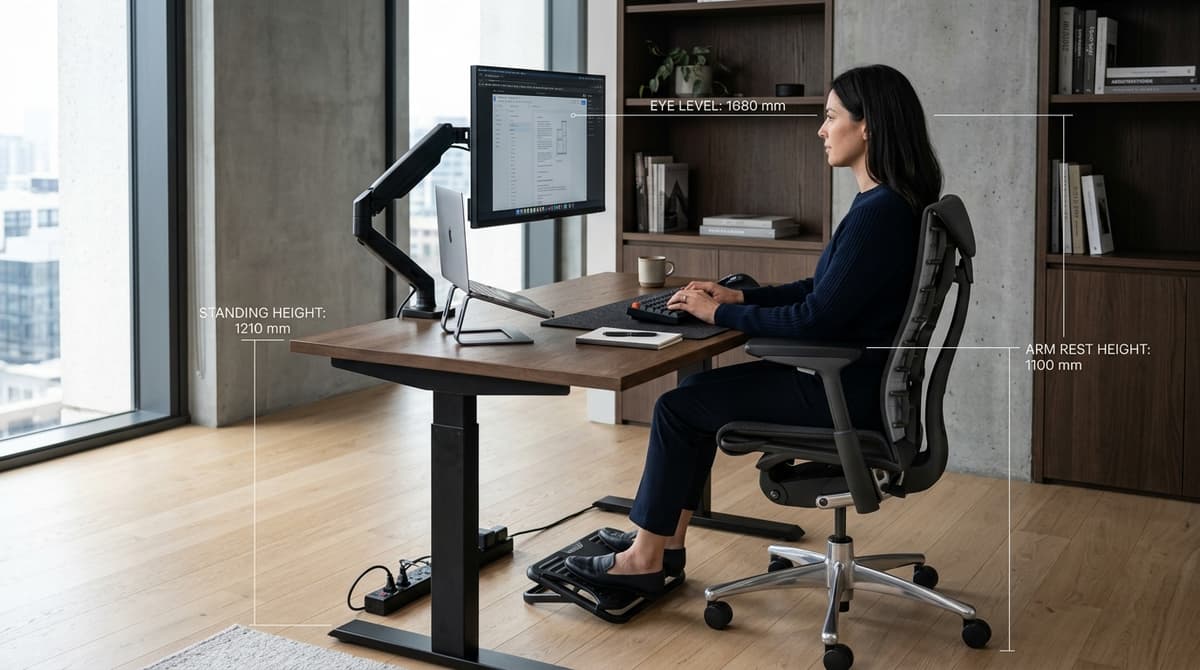
- Raise your chair to match the desk. Lift your chair until your forearms rest flat and parallel to the desk surface with your shoulders completely relaxed. Your wrists should stay flat while typing, not bent back over the edge.
- Anchor your feet with a solid footrest. Once your arms are level with the desk, your feet will almost certainly be hovering off the floor. Measure that gap and buy a rigid, wide footrest to fill it completely. An active rocking footrest is better than a soft foam pillow because gently moving your ankles keeps blood flowing through your calves. Do you actually need a footrest at your desk breaks down when this fix is required.
- Pull the seat cushion back. Slide your chair's seat cushion as far back as it goes. You want at least a two-finger gap (about 1.5 to 2.0 inches) between the front edge of the seat and the back of your calves. If your chair does not have a seat slider, use a firm lumbar pillow behind your lower back to bring your body forward without losing spine support.
- Pull your armrests inward. Slide your armrest pads inward toward your body. If your armrests sit wider than your ribs, your elbows will flare outward, forcing your neck and shoulder muscles to tense up all over again.
- Use a low-profile keyboard. Ditch tall mechanical keyboards with thick chassis. A slim keyboard under 15 mm tall keeps your typing plane flat and eliminates the need for bulky wrist rests.
If you have a fixed desk and cannot swap it out, read Keyboard tray vs desk surface to see how an under-desk articulating tray drops your typing height down into your lap without buying a whole new desk.
7. How to fix your setup: taller body protocol
If you are 6'2" or taller, follow this sequence to stop hunching and give your legs room:
- Verify seat height and under-desk room. Make sure your chair cylinder can raise your hips slightly higher than your knees. Check that your thighs slide comfortably under the desk without bumping into frames or motor boxes.
- Get a chair sized for larger frames. Generic one-size-fits-all chairs will not support you. Taller users need longer backrests and deeper seat cushions. Sized chairs like the Herman Miller Aeron Size C or the Steelcase Gesture with a deep seat pan support your full thigh without ending halfway down your leg. Herman Miller Aeron vs Steelcase Leap breaks down how these larger chairs hold up under daily use.
- Slide the seat cushion forward. Slide your seat pan forward until there is about a two- to three-inch gap behind your knee. Supporting most of your thigh takes the heavy pressure off your sitting bones.
- Get a tall-pole monitor arm. Take your monitor off its factory plastic stand. Mount it to a monitor arm with an 18- to 24-inch vertical pole. Raise the screen until your eyes naturally hit the top third of the glass when your head is upright. How high should your monitor be for good posture explains how to set screen distance and angle.
- Stabilize your standing desk. When your standing height reaches 47 to 50 inches, avoid leaning your weight on the front edge of the desk. Place your monitor mount directly over the rear legs to keep the center of gravity stable.
- Use a heavy-duty anti-fatigue mat. Thin foam mats squash flat under heavier body weights in less than twenty minutes. Use a solid 3/4-inch (20 mm) high-density polyurethane mat that pushes back firmly and keeps your feet moving while you stand. How to use a standing desk without getting tired outlines how to alternate sitting and standing across your workday.
Equipment for non-standard heights
3-stage dual-motor frame with an ultra-wide height range of 22.6 to 48.7 inches. Features a lower crossbar for rock-solid stability across extreme heights.
- 22.6" to 48.7" travel
- 3-stage telescoping legs
- BIFMA G1-2017 compliant
Heavy-duty dynamic footrest that elevates feet 2 to 5 inches while seated at high desks. Rocking motion stimulates calf venous return and eliminates popliteal pressure.
- Adjustable height angles
- Active rocking pivot
- Non-skid rubber grip
The benchmark task chair engineered specifically for operators over 6'1 (185 cm) and 200+ lbs. Offers a deeper seat pan, wider frame, and taller lumbar backrest track.
- Size C large chassis
- PosturedFit SL lumbar support
- Forward tilt & recline
Full-motion articulating monitor arm mounted to a tall steel pole. Delivers up to 24 inches of vertical elevation to eliminate forward neck hunching for tall torsos.
- Extra tall steel pole
- VESA 75x75 & 100x100
- Grommet & C-clamp options
The 2-minute desk check
Sit down at your workspace right now and run through these three physical checks:
- The knee crease test: Sit all the way back against your chair cushion. Slide your fingers behind your knee. If you cannot slide two fingers between the edge of the seat cushion and your calf, your seat is too deep. You are sliding forward and ditching your lumbar support.
- The shoulder drop test: Put your hands on your keyboard in your normal typing position. Now, take a breath and drop your shoulders completely. If your fingers lift off the keys or your forearms scrape against the desk edge, your desk is too high.
- The eye-horizon scan: Stare straight ahead at the wall without tipping your head up or down. Close your eyes, open them, and notice where your vision hits your screen. If your natural line of sight hits the plastic frame at the very top of your screen or looks over it entirely, your monitor is way too low.
If your workspace fails any of these three tests, do not waste your money on memory foam seat cushions or random desk gadgets. Fix the physical heights first. Everything in ergonomics comes down to your bone length.
For the complete end-to-end setup sequence covering chairs, desks, lighting, and cable routing, check How to set up an ergonomic home office — the complete checklist. If you are trying to figure out which piece of furniture is causing your aches, read Why your expensive ergonomic chair still feels wrong.