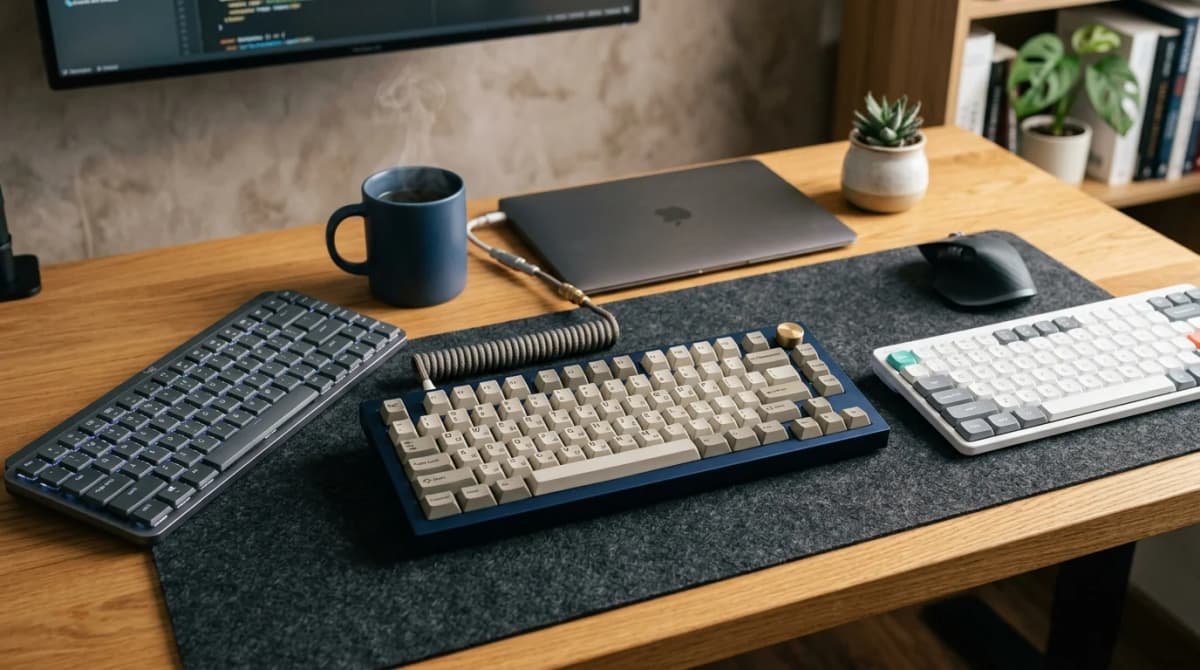

The right keyboard should disappear into the way you work. Keys feel where you expect them, typing stays comfortable through a long session, and the board fits the desk without shrinking the mouse zone.
That is harder to achieve in 2026 than it sounds. The keyboard market is flooded with products that lead with RGB lighting, "gasket-mounted" jargon, and switch specifications aimed at enthusiasts — but do almost nothing to explain whether a board will actually feel comfortable through a six-hour work session on a 48-inch desk.
The boards in this guide are chosen around a different set of priorities: how the keys feel after two hours, not two minutes; whether the size fits the desk you actually have; and whether wireless, compact, or standard layouts make more practical sense for the way you work.
If a keyboard does not fit the desk cleanly alongside the mouse, the switch type rarely matters. Measure your available input zone before comparing feel.
What actually separates keyboards in 2026
Switch marketing has overtaken usability language in most keyboard coverage. A few things actually matter more:
- Size: TKL (tenkeyless) and 75% layouts free up mouse room without sacrificing the keys most people use daily. Full-size adds a numpad most office workers rarely need. 60% and smaller layouts require learning new shortcuts for arrow keys and functions.
- Key travel: Low-profile switches (around 3–3.5 mm total travel) feel faster on shallow desks and work better with wrist rests. Standard-height switches (4 mm+) give more tactile feedback and suit people who type heavily.
- Wireless reliability: 2.4 GHz wireless is now as responsive as wired for typing. Bluetooth is convenient but adds occasional reconnect friction. Most serious wireless boards include both.
- Noise: Open-office and apartment use penalizes loud clicky switches. Linear and silent-tactile options are easier to live with in shared spaces.
- best overall office keyboard: Keychron K8 Pro
- best compact keyboard: Logitech MX Keys Mini
- best wireless mechanical: Keychron Q1 HE Wireless
- best low-profile for shallow desks: Logitech MX Keys
- best budget pick: Keychron C3 Pro
How we narrowed the list
This list stays focused on keyboards that solve a clear desk-use problem: comfortable all-day typing, clean compact sizing, reliable wireless, or quiet enough for shared spaces. Keyboards are chosen by what they get right for office and home-office use — not by whether they support 8,000Hz polling rates nobody needs for documents.
Products without a clear use-case advantage over something cheaper or better-fitting did not make the list.
A TKL wireless mechanical keyboard with hot-swap switches, solid 2.4 GHz and Bluetooth wireless, and a layout that frees up real mouse room without dropping any frequently-used keys.
- TKL layout removes numpad, gains mouse space
- Hot-swappable switches — change feel without soldering
- 2.4 GHz and Bluetooth 5.1 wireless modes
A compact wireless keyboard with backlit spherical keys, smart backlighting that wakes on hand proximity, and a layout clean enough to fit on shallow desks without crowding the mouse zone.
- Compact 75%-style layout with no numpad
- Spherical key wells designed for low-error typing
- Bluetooth multi-device pairing for up to 3 devices
A 75% gasket-mounted wireless keyboard with Hall Effect magnetic switches — no debounce delay, no switch wear, and adjustable actuation point for people who want a premium mechanical feel with serious wireless.
- Magnetic Hall Effect switches with no physical wear
- Adjustable actuation point via software
- Gasket-mounted for reduced typing vibration
A full-size low-profile wireless keyboard with a quiet, comfortable key feel that works naturally at fixed desk height without a wrist rest. The standard for flat-profile productivity boards.
- Low-profile key travel reduces wrist angle on fixed desks
- Backlit spherical keys reduce missed keystrokes
- Multi-device Easy-Switch for up to 3 paired devices
A full-size or TKL wired mechanical keyboard at a price that makes a real mechanical switch accessible without a steep learning curve.
- Hot-swappable switches on a budget
- Available in full-size and TKL
- Standard layout — no shortcuts to learn
1. Keychron K8 Pro — best overall office keyboard
The K8 Pro is the clearest recommendation for most people who want a mechanical keyboard that is actually practical for daily office work.
It is TKL (tenkeyless), which means the numpad is gone and the right side of the desk gets back usable mouse room. That trade is easy to live with for most work: the numpad is used heavily in accounting or data-entry workflows, but it sits unused through most writing, browsing, and general office sessions.
Keychron builds the K8 Pro around hot-swappable switches, which is a practical feature more than an enthusiast one. It means you can try a quieter switch type after buying without replacing the board. It also ships with both Mac and Windows keycap layouts in the box.
Wireless covers 2.4 GHz via USB dongle and Bluetooth 5.1 for up to three devices. Battery life is rated around 4,000 mAh — enough for several days of wireless use at normal backlighting settings.
Strong fit for: most home-office and hybrid workers who want a mechanical upgrade without giving up a practical layout.
Main tradeoff: TKL layout means no numpad. If you do heavy number entry, the full-size K10 Pro covers the same feature set with the numpad included.
2. Logitech MX Keys Mini — best compact keyboard
The MX Keys Mini is the more desk-conservative alternative to the full-size MX Keys. It drops the numpad, reduces overall footprint, and fits cleanly on smaller desks without pushing the mouse into a corner.
The keys use Logitech's spherical design — each key has a slight dome shape that matches fingertip contact area, which reduces the off-center press that causes most typing errors on flat-keycap boards. It is a quiet low-profile membrane key, not a mechanical switch, which makes it easier to live with in shared spaces.
Backlighting uses a proximity sensor to wake when your hands approach and dim when you step away — a small but genuinely useful feature on a battery-powered board.
It pairs to up to three devices over Bluetooth and switches between them with a key combination. There is no 2.4 GHz dongle mode, which is the main practical limitation compared to wireless mechanicals.
Strong fit for: compact desk setups, multi-device switching, and buyers who want a quiet, flat-profile board that does not need daily charging.
Main tradeoff: Bluetooth-only wireless adds occasional reconnect friction. Not the best choice if pairing reliability is the priority.
3. Keychron Q1 HE Wireless — best wireless mechanical
The Q1 HE is the board for people who want wireless mechanical without compromising on feel or longevity.
The "HE" stands for Hall Effect — the switches use magnets instead of physical contacts to register keypresses. This removes the mechanical wear point that eventually degrades standard switch feel, and eliminates the debounce delay that adds input latency in fast sequences. For everyday typing, the difference is subtle. For fast sequences where debounce adds ghosting or accidental double-input, it is more noticeable.
The actuation point is software-adjustable. Lighter actuation reduces effort for fast typists. Heavier actuation reduces accidental presses. It is one of the most practical features Hall Effect switches bring to office use.
The board is gasket-mounted, which reduces the hard plastic feel that makes cheaper boards sound and feel hollow. It ships in a 75% layout that keeps arrow keys and a function row while trimming everything non-essential.
Strong fit for: buyers who want a mechanical board that stays consistent over years of heavy typing, or who want tunable feel without swapping switches.
Main tradeoff: premium price. This is an investment board, not an entry point.
4. Logitech MX Keys — best low-profile for desk typing
The full-size MX Keys is the standard for low-profile wireless productivity keyboards, and it remains the right recommendation for people who want flat key travel without switching to a compact layout.
The keys sit lower than standard mechanical boards, which reduces the wrist angle on fixed-height desks. Most fixed-height home office desks are between 28 and 30 inches — the standard ergonomic recommendation assumes the desk can be lowered to match elbow height, which most cannot. A lower-profile keyboard closes part of that gap without requiring a keyboard tray or desk height adjustment.
Multi-device pairing works via Bluetooth Easy-Switch across three devices. The full-size layout keeps the numpad for people who use it for data entry. Backlighting and proximity sensing work the same as the Mini version.
Strong fit for: people with fixed-height desks who want to reduce wrist angle, or those who need the numpad for regular numeric work.
Main tradeoff: full-size footprint means more desk space used. If the numpad is not regularly used, the MX Keys Mini is the better call.
5. Keychron C3 Pro — best budget mechanical
The C3 Pro is the clearest entry point into mechanical keyboards for anyone moving up from a bundled membrane board. It ships with hot-swappable Keychron Red switches (linear, relatively quiet), runs on USB-C, and comes in both full-size and TKL versions.
There is no wireless, no programmability, and no premium mounting. That is not a failure — it is a deliberate trade for a much lower price. For most people considering their first mechanical board, starting here and upgrading after a few months of real use is a smarter path than buying a premium board based on spec sheets.
Strong fit for: first mechanical keyboard, office setups where wireless is not needed, and anyone who wants to try a real switch without spending over $60.
Main tradeoff: no wireless, no backlighting on base model, no software customization. A capable work tool, not a platform.
How to choose by desk and workflow
| Situation | Keyboard to consider |
|---|---|
| Standard desk, want real mechanical feel | Keychron K8 Pro |
| Small desk, mouse space is the constraint | Logitech MX Keys Mini |
| Want wireless mechanical with no compromise | Keychron Q1 HE Wireless |
| Fixed desk height, wrist angle is the issue | Logitech MX Keys |
| First mechanical keyboard, under $60 | Keychron C3 Pro |
| Need numpad for regular number entry | Full-size K10 Pro or MX Keys |
| Shared office, noise is the issue | MX Keys Mini or MX Keys (both quiet) |
Swipe sideways to compare the full chart.
What size actually means for a small desk
The layout choice matters more than most buyers realize before they measure.
A full-size keyboard plus a standard mouse on a 48-inch-wide desk leaves comfortable mouse room. On a 36-inch desk, it becomes tight immediately. TKL removes roughly 4 inches from the right side. A compact 75% removes another inch or two. A 65% layout removes the function row, which forces shortcuts most work users find disruptive.
For compact desks, the practical starting point is: MX Keys Mini or any TKL. Go smaller only after you have measured the desk and confirmed the layout trade is worth it.
If input zone management is the bigger issue — keyboard pushed to the front edge, mouse crowded — How to position your keyboard and mouse for shoulder comfort is the more useful starting read before buying a new board.
When a new keyboard is not the real fix
Before upgrading, one honest check: does the keyboard itself feel wrong, or does the input zone feel wrong?
If the keyboard is pushed to the front edge of the desk to make room for a monitor, a lamp base, or accumulated clutter, a new keyboard will not solve it. The desk layout is the problem. How to set up a small desk without losing usable space covers the layout reset that usually solves more than any hardware upgrade.
If the keyboard genuinely feels uncomfortable — wrist angle, key resistance, or reach — then a board change is warranted. Use the table above to match the problem to the right pick.
Related reading
- Low-profile vs standard keyboard for work
- Do you actually need a full-size keyboard for work or is it just stealing mouse space?
- Do you actually need a separate numpad for work?
- How to position your keyboard and mouse for shoulder comfort
- Keyboard tray vs desk surface: which is better for your wrists?
- Why your wireless keyboard misses the first key after sleep
- Best wireless mice for productivity in 2026