
A separate numpad looks like a compromise product until the desk gives you a reason to care about it.
That reason is usually not the numbers themselves. It is what the built-in numpad does to the rest of the setup.
Once a full-size keyboard is centered in front of the body, the mouse shifts farther out. For some people that change is harmless. For others it is exactly why the right side of the desk feels stretched, crowded, or slightly wrong all day. The separate numpad enters the picture when the built-in one still matters, but not enough to justify paying that cost every hour.
That is the useful way to think about it. Not as a keyboard hobby choice, and not as a novelty add-on. The question is whether the numpad is important often enough to keep within reach, but not important enough to stay attached to the keyboard all day.
A separate numpad only makes sense when the full-size keyboard is solving two different jobs
A full-size keyboard does two things at once.
It gives you the normal typing area and it gives you a permanent number-entry block. If both are part of the daily work, the layout still makes sense. There is nothing inefficient about using a full-size board for work that actually lives on the numpad.
The trouble starts when those two jobs drift apart.
That is common in mixed office work. A person may type, write, edit documents, answer messages, join calls, browse tabs, and only hit the numpad for short bursts: entering figures, adjusting values, updating sheets, filling forms. In that kind of workflow, the built-in numpad is present all day for work that only shows up in moments.
That is the opening for a separate numpad.
It keeps the number pad available, but stops charging the desk for it full-time.
The best case for a separate numpad is simple
The strongest reason to use a separate numpad is not portability or aesthetics. It is mouse space.
Standard workstation guidance has been consistent on this point for years: extra keys to the right of the main typing area push the mouse farther away, and shorter keyboards let the mouse sit closer to the body. That alone is enough to make a smaller main keyboard worthwhile on a lot of desks.
But some people still need a numpad often enough that removing it completely is annoying.
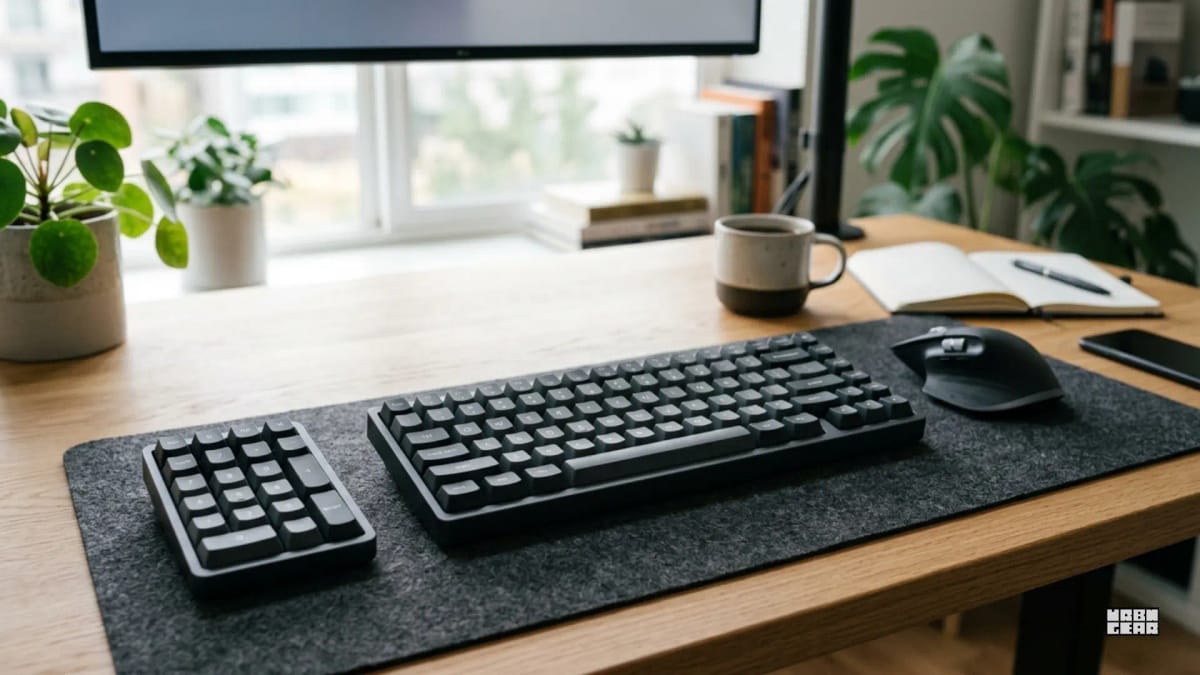
That is where a separate unit earns its place. It lets the main keyboard stay narrower for normal work, then brings number entry back when the task actually needs it. Some people keep the numpad to the right of the mouse. Others move it to the left side so the right hand stays on the mouse. The layout is less important than the principle: the numpad becomes optional again.
That flexibility is the whole point.
If the desk feels better without a full-size board, but the top number row still feels slow or clumsy for certain tasks, a separate numpad is the cleanest answer.
When a full-size keyboard is still the better tool
A separate numpad is not automatically more efficient.
If number entry is constant, a two-piece setup often becomes unnecessary work. You do not gain much by detaching a tool that never actually leaves the workflow. In that case the full-size keyboard stays cleaner because everything is already where it needs to be.
The same applies if you rely on the full right-side block in a very fixed way. Some people do not just use the numpad. They use the navigation keys constantly, want every key in the standard position, and move between regular office keyboards at home and at work. For them, a separate numpad solves the wrong problem. The real preference is not "numbers when needed." It is one stable layout.
That is why this should not be treated as a universal upgrade.
If the full-size keyboard is actively helping the work and the mouse position is not causing friction, there is nothing to fix.
Where separate numpads start to feel worse than the idea
The clean version of this setup is appealing: smaller main keyboard, more mouse room, numpad only when needed.
Real desks are messier.
A separate numpad is still another device. It needs space, power or charging, and a place to live when you are not using it. On a very small desk, that can turn into its own clutter problem. On a shared desk, it can become one more thing to move around. On a multi-device setup, it can mean another cable or another Bluetooth pairing routine.
There is also the simple question of habit. Some people do not want the numpad to be a part-time object. They want one board that always works the same way. That is a valid reason to stay with full-size.
So the separate numpad is best understood as a desk solution, not just a keyboard solution. If the desk is already crowded with a laptop, notebook, audio gear, or a USB switch, adding one more object only makes sense if the gain is obvious.
The desks that benefit most are the ones already fighting for right-side space
This is where the decision gets clearer.
If your mouse already feels slightly too far out, if your desk is narrow, or if the right side always feels busy, then a separate numpad deserves a serious look. Those are exactly the setups where a built-in numpad keeps making the main keyboard wider than the work really needs.
That is also why this article sits next to Do you actually need a full-size keyboard for work, or is it just stealing mouse space?. The two decisions are basically the same question from different angles.
The full-size article asks whether the extra width is worth it at all.
This one asks what to do when the answer is: not all the time.
The easiest way to decide
There is a simple test for this.
Pay attention for a few normal workdays and answer three questions honestly:
Does the mouse ever feel farther out than it should?
Do you use the numpad every hour, or only in bursts?
Would a second device on the desk annoy you more than the current keyboard width does?
If the mouse feels cramped, the numpad use comes in bursts, and you do not mind one extra device, a separate numpad is probably the better fit.
If the mouse feels fine, the numpad is used constantly, or you hate managing another piece of hardware, keep the full-size board.
That is really the whole decision.
Where this lands
A separate numpad makes sense when you want the mouse closer most of the time but still need fast number entry often enough that giving it up completely would be a mistake.
It makes less sense when the numbers are constant, the full-size layout already feels fine, or the desk would just trade one problem for another by adding more hardware.
The best choice is not the one with the cleverest layout. It is the one that lets the main typing area, the mouse, and the number work live on the desk without competing with each other all day.