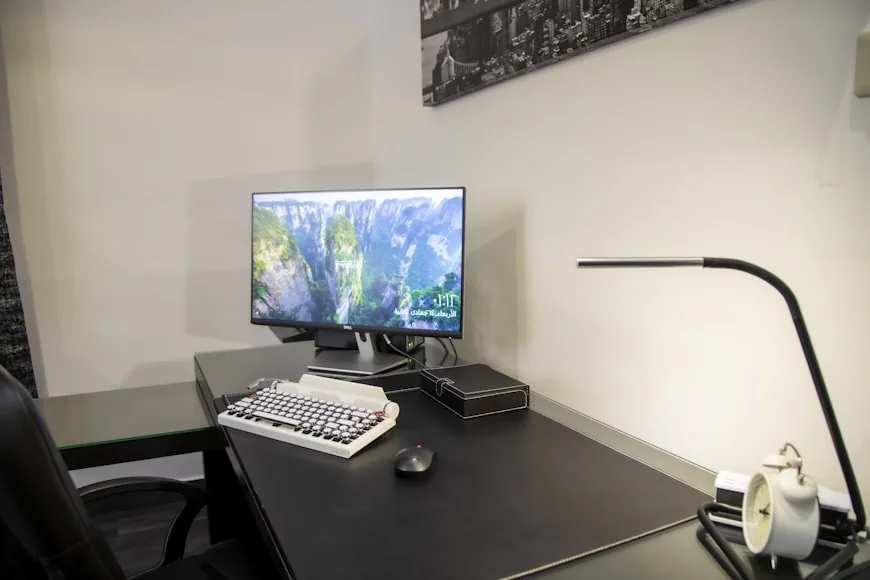

Few purchases are more annoying than office furniture that looked perfect online but started bothering you just after the return window closed.
That is how most common home office furniture mistakes show up. Nothing is obviously broken. Instead, your shoulders creep upward while you type. The monitor sits closer than you would like. A drawer unit steals knee space, or the chair refuses to tuck under the desk.
Each problem seems small. After a full workday, it does not feel small.
The usual cause is buying the chair, desk, storage, and lighting as separate objects. They work as one system: chair height affects keyboard height, desk depth controls monitor distance, and anything under the desk changes how closely you can sit.
Plan those relationships first and the buying decisions become much easier.
The chair mistakes people notice too late
The chair is where quick impressions mislead people most. Five comfortable minutes in a showroom cannot tell you how the seat, back, and armrests will feel halfway through a normal workday.
1.Buying for looks before support
A polished frame and attractive fabric can tell you whether a chair suits the room. They cannot tell you whether it suits your body.
Check the working position first. You should be able to sit against the backrest with your feet supported, shoulders relaxed, and elbows close to your sides. The armrests should support your forearms without pushing your shoulders upward, and the front of the seat should not press into the backs of your knees.
Then choose the color and fabric. A supportive chair can still look good; fit simply has to win the first round.
2.Buying the cheapest chair and calling it “good enough for now”
A low price does not automatically mean a bad chair. It does mean you should look beyond the discount badge.
Check the chair's usable adjustment ranges, published weight limit, warranty, return window, and whether common parts can be replaced. Read reviews for patterns such as loosening arms, failed cylinders, or compressed seat foam—not just first-day comfort.
If money is tight, spend on the adjustments your body actually needs and skip cosmetic extras. A simpler chair that fits is a better buy than a feature-heavy model that forces you to work around it.
3.Assuming “adjustable” means it will fit you
“Adjustable” only tells you that something moves. It does not tell you how far.
A seat may still be too high at its lowest setting. A sliding seat may remain too deep for shorter legs. Armrests can move and still fail to clear the desk or come close enough to support your elbows.
Compare the actual ranges with your body and workstation. At minimum, check seat height, seat depth, lumbar position, arm height and width, and recline control. Your feet should rest flat on the floor or on a stable footrest; your back should remain supported; and your shoulders should stay relaxed. Those checks follow OSHA's computer-workstation guidance, not a marketing label.
Use How to choose an ergonomic office chair and Office chairs that fit small home offices to narrow the options before ordering.
The desk mistakes that quietly ruin the setup
A desk has to fit the room, but it also has to place your screen and input devices where your body can use them comfortably.
4.Choosing desk size by eye instead of by monitor distance
A desktop can look spacious until you add the monitor stand, keyboard, mouse, speakers, and the few things you use every day. Then the screen moves too close and your wrists end up against the front edge.
Start with the work zone. OSHA recommends enough depth to keep the monitor directly in front of you and at least 20 inches away. Treat that as a starting point, then adjust for screen size, text size, and your vision. Keep the keyboard and mouse close enough that you do not have to reach.
Now measure the room. Include the chair pulled back, doors and drawers opening, and the walkway you still need. A deeper desk is not better if it turns the room into an obstacle course. OSHA's desk guidance is useful because it considers both desktop placement and the clear space below it.
5.Buying a fixed-height desk and forcing the chair to compensate
A fixed-height desk is not automatically a mistake. The mistake is assuming its “standard” height will work with your body and chair.
Set the chair for your legs and back first. Next, check whether you can use the keyboard and mouse with relaxed shoulders, elbows near your sides, and straight wrists. If you must raise the chair to reach a high desktop, support your feet with a stable footrest. If the surface is much too high, a suitable keyboard tray or a lower desk may be the cleaner fix.
Do not keep changing the chair until typing feels barely acceptable. That often solves one mismatch by creating another. If you already have this problem, What to do when your desk and chair height don’t match walks through the options in the right order. For anyone under 5'4" or over 6'1", the ergonomic setup guide for tall and short people details exact cylinder heights and desk elevation requirements before purchasing off-the-shelf pieces.
6.Forgetting that storage and cable plans are part of the desk decision
Storage and cable management need space, and that space often comes from somewhere your legs or chair were meant to go.
Before buying the desk, mark out the drawers, support rails, cable tray, power strip, and any computer mounted underneath. Make sure your knees clear them and that you can roll close enough to use the keyboard without reaching. Keep cables out of walkways and away from moving chair wheels.
The desktop needs a plan too. Keep the keyboard, mouse, and other frequently used tools within easy reach. Move occasional items to a drawer or shelf instead of making your body reach around permanent clutter.
How to place a cable tray under a small desk without losing knee room explains how to use the underside without turning it into an obstacle.
The room-level mistakes that make the whole setup feel wrong
Individual pieces can fit perfectly and still make the room harder to use. This final group of mistakes is about the space around the workstation.
7.Buying the furniture before deciding how the room actually needs to work
Start with what the room must still do after work ends. It may also be a bedroom, guest room, dining area, or the main path through a small apartment.
Measure the furniture in use, not just at rest. Allow for the chair rolling back, cabinet doors opening, a sit-stand desk moving, and access to windows, outlets, and exits. Painter's tape on the floor gives you a much more honest preview than a product image.
A well-reviewed desk can still be wrong if it blocks a doorway or makes another part of the room unusable. How to plan a home office in a small room before you buy anything helps you settle the layout before the boxes arrive.
8.Treating monitor support as a later accessory problem
The monitor determines how deep the desk needs to be and where your head faces for hours. It belongs in the first sketch of the room, not the last shopping basket.
NIOSH's home-office guidance suggests placing an external monitor about an arm's length away, with the top at or below eye level. Put the main screen directly in front of you. If you use a laptop for long sessions, a separate keyboard and mouse let you raise the screen without lifting your hands with it.
Check the hardware before you buy. A deep stock stand can eat up a shallow desktop. A clamp-on arm needs a compatible edge, enough clearance below it, and a desktop that can safely support the load. A riser adds height but may also push the screen closer.
Do you need a monitor riser on a 24-inch deep desk? and Monitor arms that work on small desks can help you choose the support and desk together.
9.Underestimating lighting and overestimating decorative furniture
A beautiful lamp is not helpful if it reflects in the screen, shines into your eyes, or takes over the only clear writing space.
Place the desk and monitor so daylight does not sit directly in front of or behind the screen. Blinds can control changing sunlight, while an adjustable task lamp should light papers and the work surface without washing across the display. CCOHS recommends controlling glare through lighting and monitor placement before adding an anti-glare filter.
Apply the same test to decorative shelves and side tables: do they help the room without blocking movement, light, ventilation, or useful storage? A small office still deserves personality, but decoration should not take the space that daily work needs.
The better way to buy home office furniture
Stop asking whether each product is good on its own. Ask whether it works with everything around it.
Ask instead:
Does the chair fit my body and the desk height?
Is the desk deep enough when the monitor is at a comfortable distance?
Do storage and cables leave clear space for my legs and chair?
Does this piece solve a daily problem, or does it only look useful?
Can the room still do everything else I need it to do?
For an end-to-end framework covering setup order from chair fit to lighting, see the complete home office ergonomics checklist.
Measure the answers, save the product dimensions, and check the return and warranty terms before paying. Ten quiet minutes with a tape measure can prevent years of small annoyances.
Bottom line
Most home office furniture mistakes have the same root cause: buying one piece without checking how it affects the rest of the workstation.
Fit the chair to your body. Match the desk to the chair and keyboard position. Leave enough depth for the monitor, keep the space below clear, and plan lighting around glare rather than appearance alone.
That approach takes a little longer than shopping from photos. It is still much easier than spending every workday compensating for furniture that never quite fits.